Analyze Datafresco api
Fresco API
The Fresco API provides read-only, programmatic access to the interview and protocol data in your deployment, so you can build automated export and analysis pipelines without using the dashboard.
Overview
The Interview Data API lets you fetch interview and protocol data directly from your Fresco deployment. A few things to know:
- It is read-only. You can list and retrieve data, but not change it. For one-off downloads of formatted files, the dashboard Data Export is usually simpler.
- Each deployment has its own base URL. Replace the placeholder
https://your-fresco-instance.combelow with your instance's address. - Responses are JSON, returned with
200 OK. Timestamps are ISO 8601 (UTC), and every endpoint lives under the versioned path/api/v1/.
Enabling the API
Enable the API before you can use it
The Interview Data API is off by default. Until you enable it, every request returns
403 Forbidden.
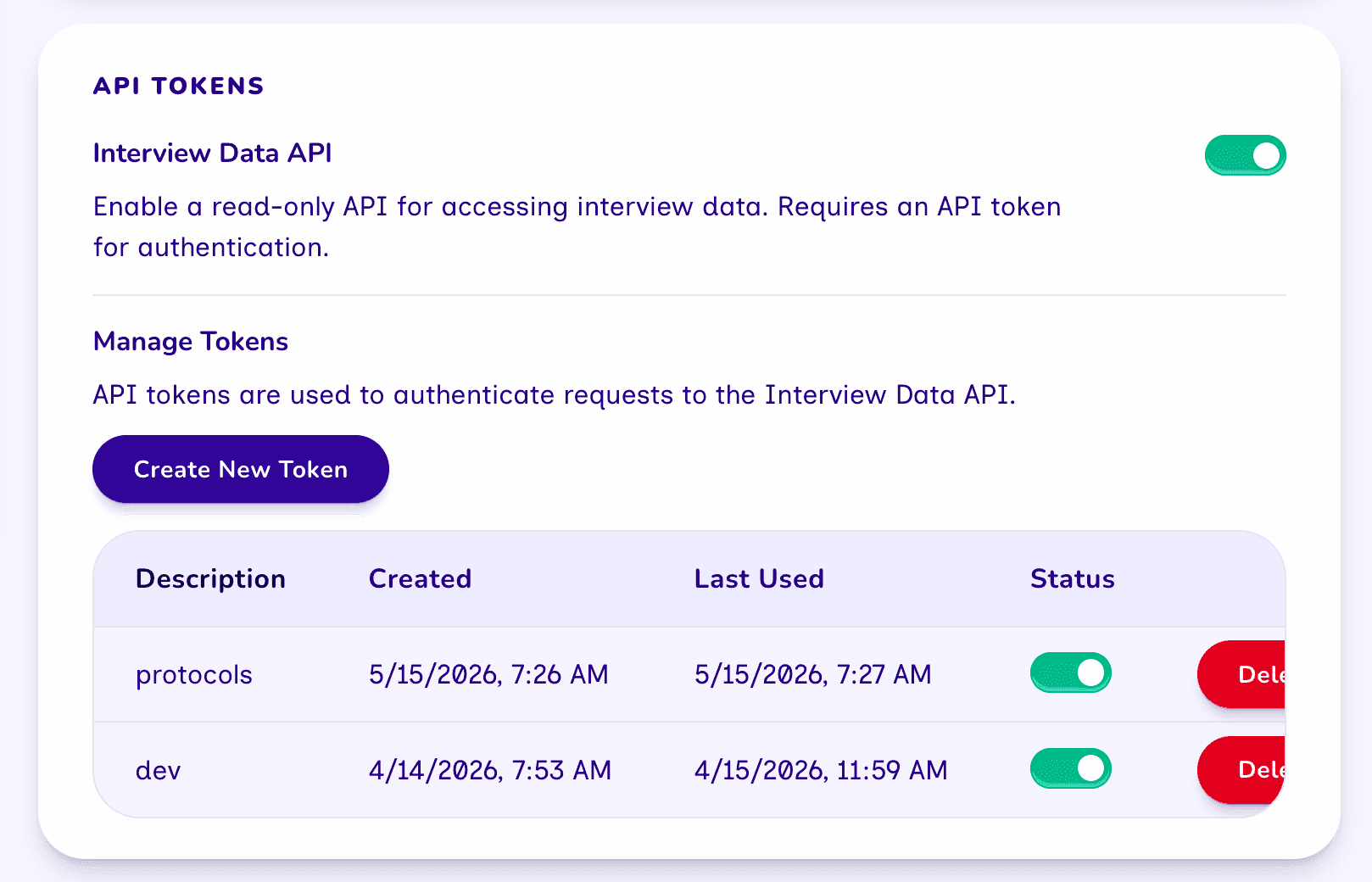
In the dashboard, go to Settings → API Tokens and turn on the Interview Data API toggle. You create and manage tokens from the same card.
Authentication
Every request must include an API token as a bearer token in the Authorization header:
Authorization: Bearer <your-token>
Create a token in Settings → API Tokens → Manage Tokens.
Take Care!
A token is shown only once, when you create it, so copy it immediately. Treat tokens like passwords: keep them out of version control (such as GitHub) and shared scripts or notebooks. If a token is exposed, delete it from Manage Tokens and create a new one.
Endpoints
All endpoints use GET and require the API to be enabled and a valid bearer token.
List interviews
GET /api/v1/interview
Returns a paginated list of interviews, most recently updated first.
Query parameters (all optional, passed in the URL query string):
| Parameter | Type | Default | Description |
|---|---|---|---|
page | integer | 1 | Page number to return. |
perPage | integer | 10 | Items per page (maximum 100). |
protocolId | string | none | Only interviews for this protocol. |
participantId | string | none | Only interviews for this participant. |
status | string | none | completed or in-progress. |
Example request
curl -H "Authorization: Bearer $FRESCO_TOKEN" \
  "https://your-fresco-instance.com/api/v1/interview?status=completed&perPage=50"
Example response
{
  "data": [
    {
      "id": "clx0a1b2c3d4e5f6g7h8",
      "startTime": "2026-06-10T10:30:00.000Z",
      "finishTime": "2026-06-10T11:12:00.000Z",
      "lastUpdated": "2026-06-10T11:12:00.000Z",
      "currentStep": 5,
      "protocolId": "protocol123",
      "participantId": "participant456",
      "participant": {
        "id": "participant456",
        "identifier": "P-0042",
        "label": "Participant 42"
      },
      "protocol": { "id": "protocol123", "name": "Social Support Study" }
    }
  ],
  "meta": { "page": 1, "perPage": 50, "pageCount": 3, "total": 124 }
}
Response fields
Each object in data is an interview summary:
| Field | Description |
|---|---|
id | Unique interview identifier. |
startTime | When the interview started. |
finishTime | When it was completed, or null while in progress. |
lastUpdated | When the interview data last changed. |
currentStep | The stage the participant has reached. |
protocolId | id of the protocol used. |
participantId | id of the participant. |
participant | Participant summary: id, identifier, label. |
protocol | Protocol summary: id, name. |
The meta object describes the current page:
| Field | Description |
|---|---|
page | The current page number. |
perPage | Items per page. |
pageCount | Total number of pages. |
total | Total interviews matching the query. |
Get a single interview
GET /api/v1/interview/{interviewId}
Returns the full record for one interview, including the collected network and the
protocol with its codebook. Returns 404 if the id does not exist.
Example request
curl -H "Authorization: Bearer $FRESCO_TOKEN" \
  "https://your-fresco-instance.com/api/v1/interview/clx0a1b2c3d4e5f6g7h8"
Example response
{
  "data": {
    "id": "clx0a1b2c3d4e5f6g7h8",
    "startTime": "2026-06-10T10:30:00.000Z",
    "finishTime": "2026-06-10T11:12:00.000Z",
    "exportTime": null,
    "lastUpdated": "2026-06-10T11:12:00.000Z",
    "currentStep": 5,
    "isSynthetic": false,
    "network": {
      "nodes": [
        {
          "_uid": "a1c2...",
          "type": "person",
          "attributes": { "b8f6...": "Alex", "c9a7...": 34 }
        }
      ],
      "edges": [
        {
          "_uid": "e9f8...",
          "type": "friendship",
          "from": "a1c2...",
          "to": "b3d4...",
          "attributes": {}
        }
      ],
      "ego": { "_uid": "0000...", "attributes": { "d1e2...": true } }
    },
    "stageMetadata": null,
    "protocolId": "protocol123",
    "participantId": "participant456",
    "participant": {
      "id": "participant456",
      "identifier": "P-0042",
      "label": "Participant 42"
    },
    "protocol": {
      "id": "protocol123",
      "name": "Social Support Study",
      "schemaVersion": 8,
      "description": "A study of personal support networks.",
      "codebook": { "node": {}, "edge": {}, "ego": {} }
    }
  }
}
Response fields
The data object contains the full interview record:
| Field | Description |
|---|---|
id | Unique interview identifier. |
startTime | When the interview started. |
finishTime | When it was completed, or null while in progress. |
exportTime | When the interview was last exported from the dashboard, or null if never. |
lastUpdated | When the interview data last changed. |
currentStep | The stage the participant has reached. |
isSynthetic | true for generated test data, false for a real interview. |
network | The collected network data (nodes, edges, ego). |
stageMetadata | Internal metadata for certain stages, such as Dyad and Tie-Strength Census negative responses. Usually null. |
protocolId | id of the protocol used. |
participantId | id of the participant. |
participant | Participant summary: id, identifier, label. |
protocol | Protocol detail: id, name, schemaVersion, description, codebook. |
List protocols
GET /api/v1/protocols-meta
Returns metadata for every protocol, most recently imported first, as a plain array. Use an
id from here as the protocolId filter on the interviews endpoint.
Example request
curl -H "Authorization: Bearer $FRESCO_TOKEN" \
  "https://your-fresco-instance.com/api/v1/protocols-meta"
Example response
[
  {
    "id": "protocol123",
    "name": "Social Support Study",
    "importedAt": "2026-06-01T08:00:00.000Z",
    "lastModified": "2026-06-09T15:30:00.000Z"
  }
]
Response fields
Each object in the array describes one protocol:
| Field | Description |
|---|---|
id | Unique protocol identifier. Use it as the protocolId filter on the interviews endpoint. |
name | The protocol's name. |
importedAt | When the protocol was imported into the deployment. |
lastModified | When the protocol file was last modified. |
Pagination
The interviews endpoint returns a meta object with page, perPage, pageCount, and
total. Because perPage is capped at 100, large datasets span multiple pages: request
page 1, read meta.pageCount, then fetch each remaining page.
curl -H "Authorization: Bearer $FRESCO_TOKEN" \
  "https://your-fresco-instance.com/api/v1/interview?page=2&perPage=100"
Code examples
Complete, runnable scripts that authenticate, list interviews, page through every result, and fetch a single interview's network are maintained in the Fresco repository:
example-api-query.R(R, usinghttr2)example-api-query.py(Python, usingrequests)
Set FRESCO_API_URL and FRESCO_API_TOKEN as environment variables (or edit the values at
the top of each script) before running.
R
# Example: Query the Fresco Interview Data API using R.
#
# Prerequisites:
#     install.packages(c("httr2", "jsonlite"))
#
# Usage:
#     1. Enable the Interview Data API in Fresco (Dashboard -> Settings).
#     2. Create an API token and copy it.
#     3. Set FRESCO_API_URL and FRESCO_API_TOKEN below (or as environment variables).
#     4. Run: Rscript example-api-query.R

library(httr2)
library(jsonlite)

FRESCO_API_URL <- Sys.getenv("FRESCO_API_URL", "https://your-fresco-instance.com")
FRESCO_API_TOKEN <- Sys.getenv("FRESCO_API_TOKEN", "your-api-token-here")

base_url <- paste0(FRESCO_API_URL, "/api/v1")

#' Fetch a paginated list of interviews.
#'
#' @param page Page number (default 1).
#' @param per_page Results per page (default 10, max 100).
#' @param protocol_id Optional protocol ID filter.
#' @param status Optional status filter: "completed" or "in-progress".
#' @return Parsed JSON response with `data` and `meta`.
list_interviews <- function(page = 1, per_page = 10, protocol_id = NULL, status = NULL) {
  req <- request(paste0(base_url, "/interview")) |>
    req_headers(Authorization = paste("Bearer", FRESCO_API_TOKEN)) |>
    req_url_query(page = page, perPage = per_page)

  if (!is.null(protocol_id)) req <- req |> req_url_query(protocolId = protocol_id)
  if (!is.null(status)) req <- req |> req_url_query(status = status)

  resp <- req |> req_perform()
  resp_body_json(resp)
}

#' Fetch a single interview with full network data.
#'
#' @param interview_id The interview ID.
#' @return Parsed JSON response with `data`.
get_interview <- function(interview_id) {
  req <- request(paste0(base_url, "/interview/", interview_id)) |>
    req_headers(Authorization = paste("Bearer", FRESCO_API_TOKEN))

  resp <- req |> req_perform()
  resp_body_json(resp)
}

#' Fetch all interviews across all pages.
#'
#' @param ... Additional arguments passed to list_interviews (e.g. status, protocol_id).
#' @return A data frame of all interviews.
get_all_interviews <- function(...) {
  all_data <- list()
  page <- 1

  repeat {
    result <- list_interviews(page = page, per_page = 100, ...)
    all_data <- c(all_data, result$data)

    if (page >= result$meta$pageCount) break
    page <- page + 1
  }

  # Convert list of interviews to a data frame
  do.call(rbind, lapply(all_data, function(interview) {
    data.frame(
      id = interview$id,
      participant_identifier = interview$participant$identifier,
      protocol_name = interview$protocol$name,
      start_time = interview$startTime,
      finish_time = ifelse(is.null(interview$finishTime), NA, interview$finishTime),
      current_step = interview$currentStep,
      stringsAsFactors = FALSE
    )
  }))
}

# --- Main ---

# List completed interviews (first page)
result <- list_interviews(status = "completed")
cat(sprintf("Total interviews: %d\n", result$meta$total))

for (interview in result$data) {
  cat(sprintf(
    "  %s  participant=%s  protocol=%s  finished=%s\n",
    interview$id,
    interview$participant$identifier,
    interview$protocol$name,
    ifelse(is.null(interview$finishTime), "NA", interview$finishTime)
  ))
}

# Fetch full network data for the first interview
if (length(result$data) > 0) {
  first_id <- result$data[[1]]$id
  detail <- get_interview(first_id)
  network <- detail$data$network

  cat(sprintf("\nInterview %s network:\n", first_id))
  cat(sprintf("  Nodes: %d\n", length(network$nodes)))
  cat(sprintf("  Edges: %d\n", length(network$edges)))
}
Python
"""
Example: Query the Fresco Interview Data API using Python.

Prerequisites:
    pip install requests

Usage:
    1. Enable the Interview Data API in Fresco (Dashboard → Settings).
    2. Create an API token and copy it.
    3. Set FRESCO_API_URL and FRESCO_API_TOKEN below (or as environment variables).
    4. Run: python example-api-query.py
"""

import os
import requests

FRESCO_API_URL = os.environ.get("FRESCO_API_URL", "https://your-fresco-instance.com")
FRESCO_API_TOKEN = os.environ.get("FRESCO_API_TOKEN", "your-api-token-here")

BASE = f"{FRESCO_API_URL}/api/v1"
HEADERS = {"Authorization": f"Bearer {FRESCO_API_TOKEN}"}


def list_interviews(page=1, per_page=10, protocol_id=None, status=None):
    """Fetch a paginated list of interviews."""
    params = {"page": page, "perPage": per_page}
    if protocol_id:
        params["protocolId"] = protocol_id
    if status:
        params["status"] = status  # "completed" or "in-progress"

    resp = requests.get(f"{BASE}/interview", headers=HEADERS, params=params)
    resp.raise_for_status()
    return resp.json()


def get_interview(interview_id):
    """Fetch a single interview with full network data."""
    resp = requests.get(f"{BASE}/interview/{interview_id}", headers=HEADERS)
    resp.raise_for_status()
    return resp.json()


def get_all_interviews(**kwargs):
    """Iterate through all pages and return every interview."""
    all_interviews = []
    page = 1
    while True:
        result = list_interviews(page=page, per_page=100, **kwargs)
        all_interviews.extend(result["data"])
        meta = result["meta"]
        if page >= meta["pageCount"]:
            break
        page += 1
    return all_interviews


if __name__ == "__main__":
    # List completed interviews (first page)
    result = list_interviews(status="completed")
    print(f"Total interviews: {result['meta']['total']}")
    for interview in result["data"]:
        print(
            f"  {interview['id']}  "
            f"participant={interview['participant']['identifier']}  "
            f"protocol={interview['protocol']['name']}  "
            f"finished={interview['finishTime']}"
        )

    # Fetch full network data for the first interview
    if result["data"]:
        first_id = result["data"][0]["id"]
        detail = get_interview(first_id)
        network = detail["data"]["network"]
        print(f"\nInterview {first_id} network:")
        print(f"  Nodes: {len(network.get('nodes', []))}")
        print(f"  Edges: {len(network.get('edges', []))}")
Errors
Errors use a standard HTTP status code with a JSON { "error": ... } body.
| Status | Meaning |
|---|---|
401 Unauthorized | Missing, invalid, or deactivated token. |
403 Forbidden | The Interview Data API is turned off in Settings. |
404 Not Found | Unknown interview id, or unsupported API version. |
500 Internal Server Error | Unexpected server error. |
Versioning
The version is pinned in the URL path; the current (and only) version is v1. Future
incompatible changes will ship under a new version path so existing integrations keep
working.