Design Protocolsinterface documentation
Anonymisation
- Type
- Utility
- Creates
- A passphrase that encrypts the attributes you choose
- Uses prompts
- No
- Configure in
- Architect Classic (not available)
- Architect
- Run in
- Interviewer Classic (not available)
- Interviewer
- Fresco
Requires protocol schema 8 or later.
This interface lets participant data be encrypted on-device, in such a way as to prevent anyone other than the participant, including the researcher, from accessing it.
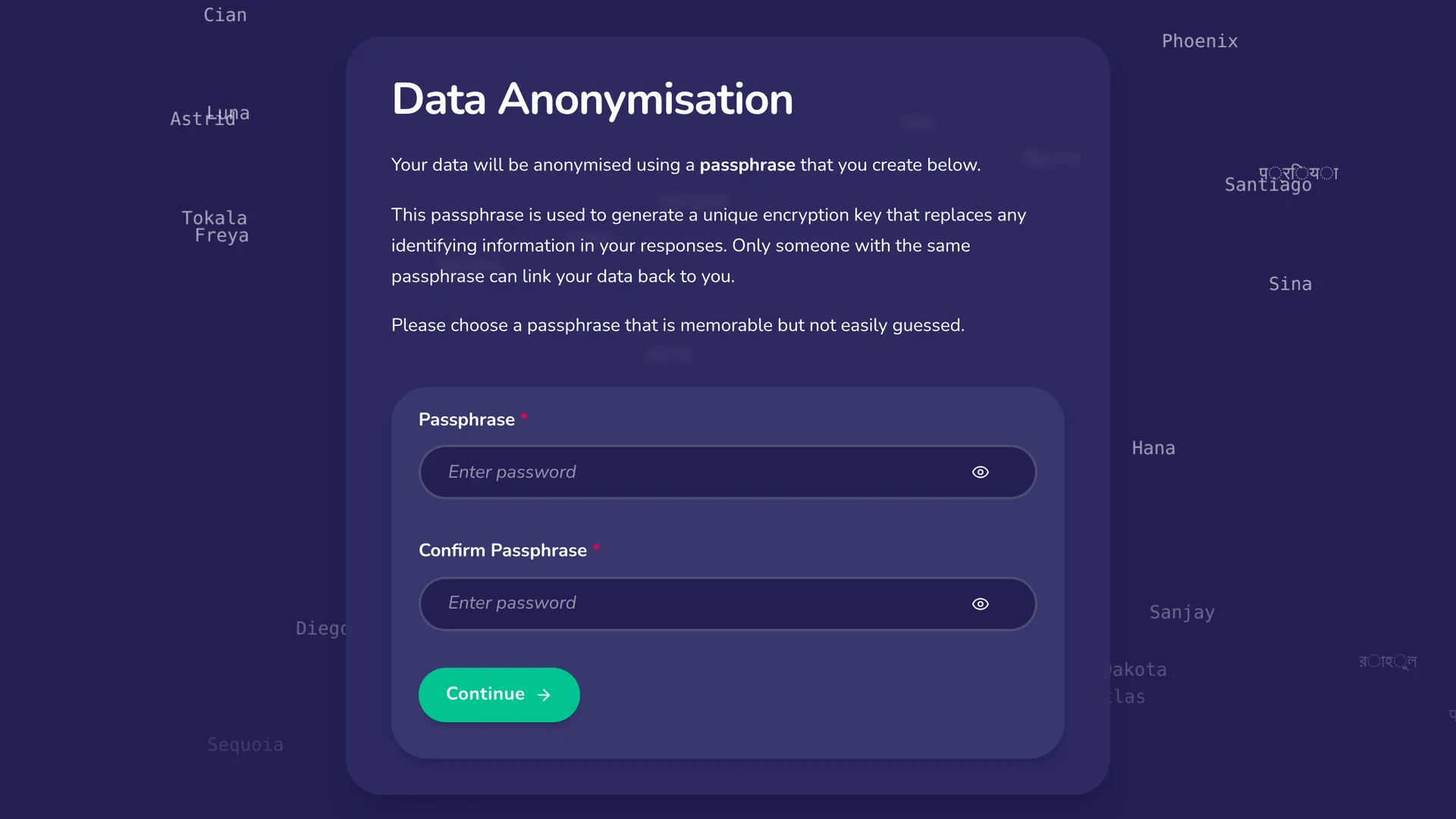
Adding this interface to your protocol will enable you to select which node attributes are encrypted. When viewing this stage, your participants will be asked to choose a passphrase, and to enter it a second time to confirm it. The passphrase is what protects their data. Every attribute you mark as encrypted is encrypted during interviews.
Write what participants read before they choose a passphrase in the Task explanation section of the stage editor. It is a single text. To give the screen a title, start the text with a heading, using Heading 1 in the toolbar.
In the Encrypted attributes section of the stage editor, each node type in your protocol has its own switch. Turn a type's switch on, then tick the text attributes of that type that should be encrypted. Only text attributes can be encrypted, and edge attributes are not offered. Turning a type's switch off stops encrypting every attribute of that type at once; Architect asks you to confirm before it clears them.
Encrypted attributes in skip logic, filters and sorting
Skip logic and filters are checked without the participant's passphrase, so they can't read the answers to an encrypted attribute. This means a rule can't compare those answers, for example to check whether a name is "Alice". A rule can still check whether an encrypted attribute has been answered at all. When you build a rule on an encrypted attribute, Architect offers only exists and does not exist.
Architect won't let you encrypt an attribute while a rule compares its answers. Remove that rule first, or change it so it only checks whether the attribute is answered.
There is one exception. A panel that lists people from an external data file can still compare an encrypted attribute's answers, because the data in that file isn't encrypted.
If you upgrade a schema 8 protocol that encrypts attributes, any skip logic or filter rule that compared the answers to one of them is removed. Under schema 8, these rules only ever compared the encrypted text, never the answer itself. Rules that only check whether an encrypted attribute is answered keep working, so they stay.
Skip logic that is left with no rules is removed, so its stage is now always shown. If a stage was set to show only when a removed rule matched, it may never have appeared before, so it may now appear for the first time. A filter that is left with no rules is removed too, so it no longer limits what its stage or panel shows.
Check the stages that used the removed rules, because the rules that remain may now match differently. If all the rules had to match, the remaining ones match at least as often as before. If any one rule could match, they match at most as often.
You can still sort a list by an encrypted attribute, such as a name. Once the participant has entered their passphrase, the list is sorted by their answers. Until then, or if an answer can't be read, the list ignores that sort rule, so its order never hints at what the answers say.
Passphrase length
By default, a participant must choose a passphrase of at least 8 characters.
To set your own limits, use the Passphrase validation section of the stage editor. Switch on Minimum text length to set the shortest passphrase you will allow, and Maximum text length to set the longest. A minimum you set always replaces the default of 8, even if yours is shorter. The minimum can't be longer than the maximum.
If you set a maximum shorter than 8 and no minimum, the default minimum is lowered to your maximum, so participants can still choose a passphrase. The stage editor shows the minimum that applies.
Length rules apply when a participant first chooses their passphrase, which is also when they confirm it by entering it a second time. When they come back to the interview later, they only need to enter the same passphrase again.
Passphrase wording
The words around the passphrase are part of your protocol's interview text, not of this stage, because any later stage that shows an encrypted answer asks for the passphrase too. They include the labels of the passphrase and confirmation fields, the explanation of what the passphrase protects, the message shown when a passphrase doesn't match the one chosen earlier, the message shown when it is accepted, and the notices shown in place of answers that are locked or can't be shown. Network Canvas supplies them in each language it has wording for. Your protocol holds them only while it encrypts an attribute or has an Anonymisation stage, and you can reword and translate them in the translation table.
How answers are protected
Protection happens on the participant's own device, using the Web Crypto API. Answers are encrypted before they are stored, so the interview data never holds them in readable form.
- One key for each interview. When a participant chooses a passphrase, the interview derives a single encryption key from it. The key is derived with PBKDF2-SHA256, using 600,000 iterations and a salt derived from the interview's own ID, so the same passphrase gives a different key in every interview. This is deliberately slow, which makes guessing a passphrase expensive.
- Strong encryption for every answer. Each encrypted answer is encrypted with that key using AES-256-GCM, with a fresh random value for every answer.
- Answers are tied to their place. Each answer is bound to the person and the question it belongs to, so an encrypted answer that is copied to another person or question cannot be read.
- Answers are padded. Each answer is padded to a fixed block size before it is encrypted, so the length of an encrypted answer reveals less about what it says.
- The passphrase is checked, not stored. When a participant enters their passphrase again, the interview derives the key from it and tries to decrypt one of the answers already protected. Only the right passphrase can, so a mistyped one is turned away. Nothing about the passphrase or the key is stored to make this check. Until the first answer has been protected, there is nothing to check a passphrase against, so the passphrase entered then becomes the interview's.
The passphrase is never stored. The key is held only in memory, in the browser or app running the interview, and is never saved. This means that refreshing the page, closing the tab, or visiting the interview from another browser or device will require the participant to enter their passphrase again. The encrypted answers are stored with the rest of the interview, and can only be read by someone who knows the passphrase.
If a participant forgets their passphrase
Take Care!
A forgotten passphrase cannot be recovered by anyone, including you, the participant, and the Network Canvas team. The answers it protects stay unreadable.
Make sure participants understand this before they choose a passphrase. The Task explanation section of the stage editor is the place to tell them. A longer passphrase is harder to guess, but also harder to remember.
Exporting protected answers
When exporting this data, the encrypted attributes will not be included in the export file in readable form. Every encrypted answer is replaced with the string ENCRYPTED. A value that was not encrypted when it was saved is exported as it was saved.
Answers protected by the experimental version
In schema 8 protocols, the Anonymisation interface was an experimental feature, and it protected answers in an earlier format. Fresco and Interviewer never upgrade a protocol to schema 9, so a schema 8 protocol and its interviews keep running as schema 8, and answers protected this way can still be read there with the right passphrase.
Upgrading a protocol to schema 9 in Architect creates a new protocol. Interviews you collected with the schema 8 protocol stay with it, and the upgraded protocol protects new answers in the way described on this page. See Schema version 9 for what else changes when you migrate a protocol.
Best Practices
Ensure that the passphrase is strong and unique to prevent unauthorized access to the encrypted data, but balance this against the need for participants to remember it easily.
Use this feature to encourage disclosure of sensitive information, such as names, in a way that makes participants feel secure about their privacy. This can lead to more honest and complete responses in interviews.
When using the anonymisation interface, clearly communicate to participants how their data will be used and the importance of the passphrase for accessing their encrypted data, including that a forgotten passphrase cannot be recovered. This transparency builds trust and encourages participation.
Try to Avoid
Do not use the anonymisation interface for data that is not sensitive or does not require encryption. This interface is intended for use with sensitive data where privacy and security are paramount.