desktop 🠖 interface documentation
Family Tree Census
Type:
Name Generator, Edge Generator, Name Interpreter
Creates:
Nodes and edges representing family relationships, with attribute data
Uses Prompts:
true
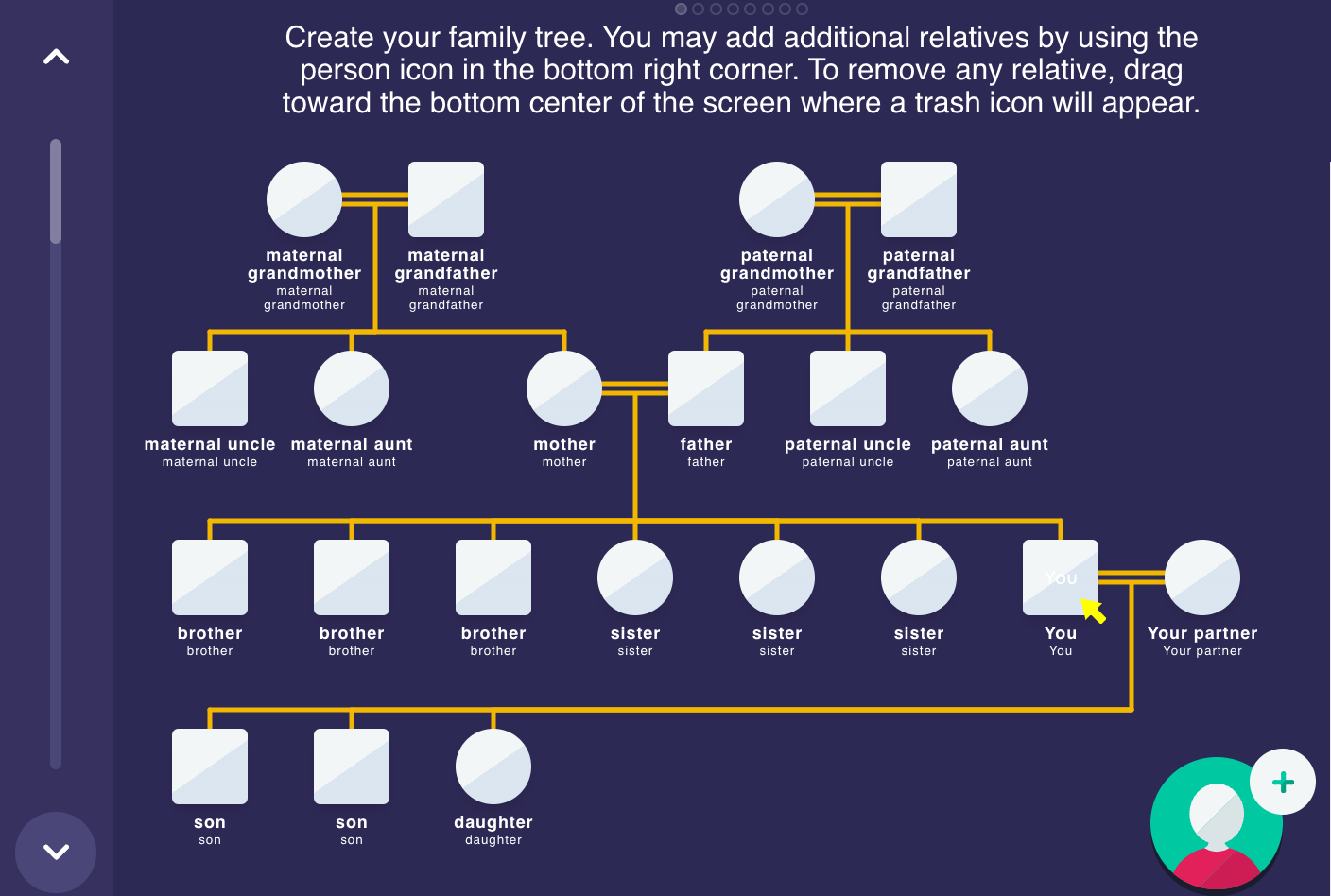
The Family Tree Census is a specialized interface designed for collecting family network data. It provides a structured, visual approach that allows participants to build their family tree by creating family members (nodes) and defining the relationships between them (edges).
Unlike other name generators, the Family Tree Census uses a multi-step process that guides participants through building the structure of their family tree before adding detailed information about each family member.
Scaffolding Step
In the scaffolding step, participants build the basic structure of their family tree. They add family members as nodes and define the relationships between them using a visual tree-building interface. The interface automatically positions nodes based on family relationships.
Configure this step with:
- Prompt Text: Instructions shown to participants explaining how to build their family tree
- Quick Start Modal: Optionally show a form that allows participants to quickly scaffold a start to their family tree
Name Generation Step
In this step, participants add information about each family member. A configurable form allows you to collect specific attributes for each node.
Configure this step with:
- Prompt Text: Instructions explaining the task
- Form Title: The heading displayed on the form (e.g., "Add personal information")
- Form Fields: Add fields to collect specific attributes about each family member
Family Tree Variables
The Family Tree Census requires specific variables to store family tree data. These variables are used internally by the interface to manage the tree structure and visual representation.
Ego Variables
| Variable | Type | Description |
|---|---|---|
| Ego Biological Sex | Categorical (male/female) | Stores the participant's biological sex. Used to determine visual representation in the family tree. |
Alter Variables
| Variable | Type | Description |
|---|---|---|
| Alter Biological Sex | Categorical (male/female) | Stores each alter's biological sex. Used for visual representation in the family tree. |
| Relationship to Participant | Text | Stores each person's relationship to the participant (e.g., mother, uncle, daughter). Automatically calculated by the interface based on tree structure. |
| Ego Identifier | Boolean | Identifies which node represents the participant (ego) in the family tree. This variable can be used in future stage filtering to remove the ego from node attribute collection. |
Edge Variables
| Variable | Type | Description |
|---|---|---|
| Relationship Type | Categorical (parent/partner) | Stores the type of relationship between two family members. |
Disease Nomination Step (Optional)
If enabled, this step allows participants to identify family members who have experienced specific health conditions or diseases. Each prompt:
- Asks about a specific condition using customizable prompt text
- Stores responses in a boolean variable on each node
- Allows participants to identify which family members are affected by highlighting nodes where the variable value is true
Best Practices
Ensure you collect a value for a variable called name on your form, so that node labelling works correctly.
Use the Disease Nomination Step for collecting health condition data rather than adding boolean fields to the name generation form. This dedicated step provides a more intuitive interface for participants to identify affected family members.
Try to Avoid
Resist the urge to create long forms with many items. Since participants will complete this form for each family member, shorter forms reduce response burden and encourage more complete family trees.