Design Protocolskey concepts
Piped Text
Purpose
Computer-assisted survey instruments have long tailored question wording to the respondent by inserting earlier answers into later questions, a technique usually called piping or text fill. Network instruments have a particular need for it. A name interpreter asks the same questions about each alter in turn, and a Dyad Census asks the same question about every pair of alters. Without piping, such questions must refer to the alter indirectly ("this person", "these two people") and rely on the participant to connect the question with the node on the screen.
Naming the node in the question removes that inferential step. "Did you visit Northwestern University or study there?" identifies its referent unambiguously, while "Did you visit this university, or study there?" does so only in combination with the visual layout of the interface. The difference is greatest when nodes resemble one another, when the participant has named many alters, and when the interview is administered by an interviewer who reads the question aloud.
Piped text also allows a later question to build on an earlier one. A question can recall the date that the participant gave for a life event, address the participant by the name that they provided, or be phrased differently according to how the participant answered a previous question. A translatable string can also contain logic, which chooses between alternative wordings according to rules about the participant, a node or an edge.
Network Canvas fills piped text from data already recorded in the interview. Inserting a value into a question does not store that value a second time, and does not send it anywhere else.
Good to know:
Piped text requires schema 9. Protocols that use it are built in Architect and run in Fresco 5.0 or later, or Interviewer 9.0 or later.
Methodological considerations
Piping changes the stimulus that each participant receives. Two participants answering the "same" name interpreter question read different words, because each question names a different alter. For most network instruments this is the intended effect: the construct being measured is the participant's relationship with a specific alter, and naming that alter makes the question more precise. It nevertheless calls for three precautions.
- Report the template, not the realized wording. When describing an instrument in a publication or an ethics application, give the question as written in the protocol, with the piped element marked, and state which attribute supplied it. Where a translatable string contains logic, report each of its wordings, together with the rules or the answer that selects it.
- Specify the wording used when information is missing. Any attribute can be absent when a question is shown (see When information is missing). The alternative wording is part of the instrument and should be reviewed with the same care as the primary wording.
- Pilot with realistic data. Long names, names that are also common words, and unexpected answers can produce questions that read poorly. Cognitive interviews and pilot sessions (see Piloting Your Study) should include the range of values that participants are likely to provide.
Piping is also a design decision about disclosure. A question that repeats a participant's answer displays that answer on screen again, which may matter when interviews take place in shared or public settings. Encrypted attributes are never offered for piping.
What can be piped
Each piece of information inserted into a translatable string is a piped value. A piped value is one of the following:
- Today's date. This is the only information about the interview itself that a translatable string can show. It is the date on which the participant reads the string.
- An attribute of the participant, such as a name or an answer from an Ego Form.
- The label of a node that the string concerns, on stages and forms that ask about one node or two nodes at a time. This is the text that the interview displays on the node, so a question on a Dyad Census can ask "Are Jim and Alice friends?" using the same names that the participant sees on the two nodes. See Node labels.
- An attribute of the node or edge that the string concerns, on the same stages and forms. A Per Alter Form question can, for example, name the university that the participant nominated for that node on an earlier stage.
The following kinds of attribute can be piped: text, number, scalar, date, boolean (yes or no), ordinal and categorical. Encrypted attributes are never offered, and neither are layout or location attributes.
The values available to a translatable string depend on where the string appears. See Where piped text can be used.
By means of logic, a translatable string can also change its wording without showing a value. See Logic.
Inserting piped text in Architect
Every text field that accepts piped text has two buttons for it in its toolbar. The syringe button, labeled Inject piped text from interview metadata or a network attribute, inserts values. The button beside it, labeled Insert logic, inserts logic. The syringe button's menu contains values only, and so does the menu that opens when { is typed. To insert a value:
- Place the cursor in the text where the value should appear.
- Click the syringe button, or type
{. - A menu lists the values that this string can show. Type to filter the list.
- Choose a value by clicking it, or press Enter to choose the highlighted value.
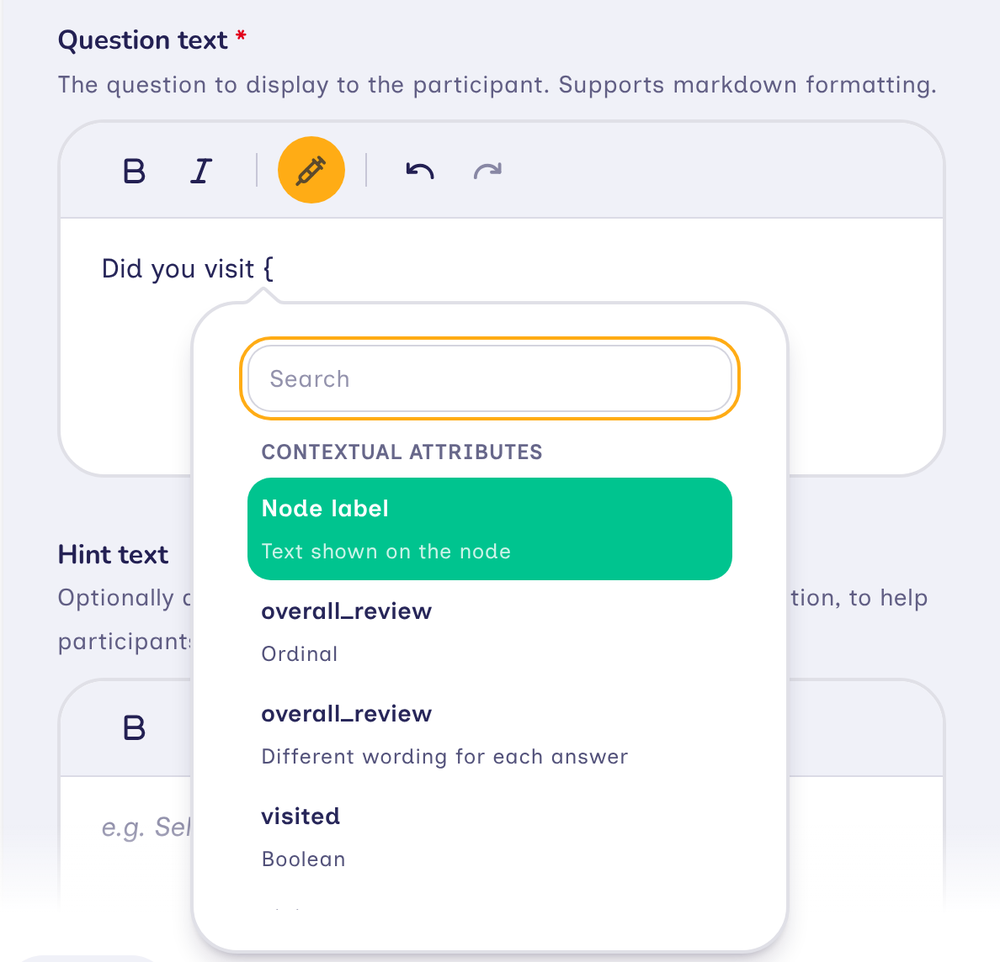
The menu groups values under three headings, in this order:
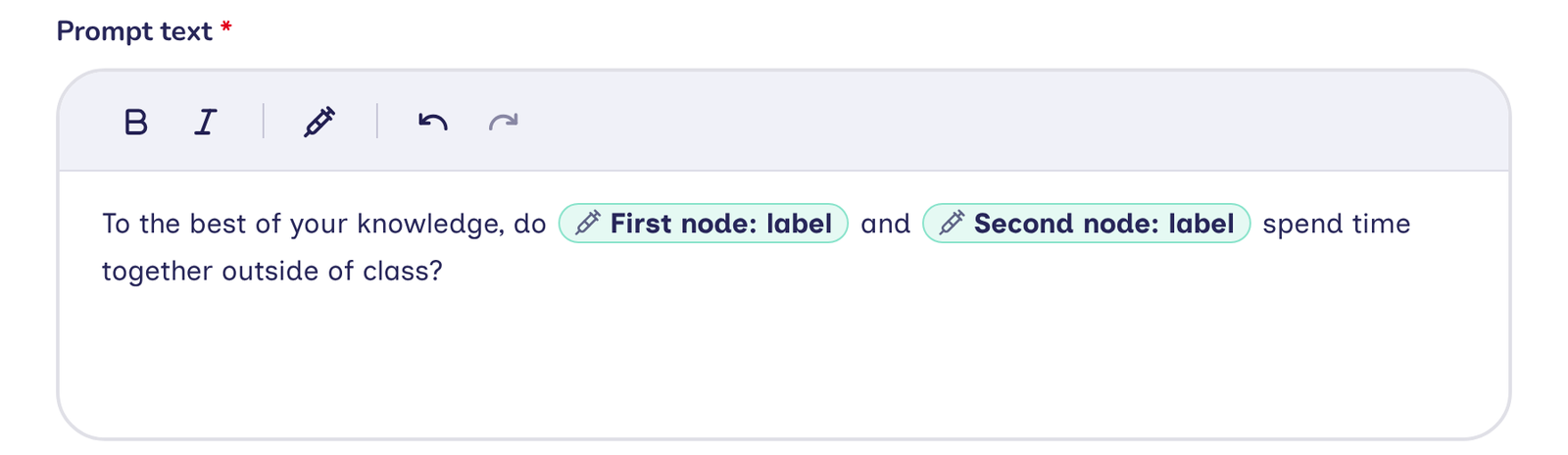
- Contextual Attributes: the label and attributes of the entity that the translatable string refers to, that is, the node or edge that a form asks about, or the node that a prompt asks about. A node's label is listed first, as Node label. Where the string concerns two nodes, as with a pair on a Dyad Census or Tie-Strength Census or the two ends of an edge, every value names the node that it belongs to, such as First node: label, First node: nickname and Second node: label (see Where piped text can be used).
- Ego Attributes: the participant's attributes.
- Interview Attributes: today's date.
Beneath each value, the menu states what kind of attribute it is. A boolean attribute whose answers have no labels is listed but cannot be chosen, because the string would have nothing to show for its answer. Its entry reads Add labels for its yes and no answers first, or, for an attribute answered with a Toggle, A Toggle has no labels for its answers. Use different wording for each answer instead. See Different wording for each answer.
To type a literal brace, press Escape after typing {. The menu closes and the brace remains in the text.
In the editor, a piped value appears as a pill that begins with the syringe icon and carries the name of its attribute, such as nickname. Where the translatable string concerns two nodes, the pill also names the node, such as First node: nickname. A node's label appears as Node label, or as First node: label and Second node: label, and today's date appears as Today's date. The same pills appear in the translation table and on the protocol's Summary tab. The interactive preview beside a form field shows the pill in place of the value.
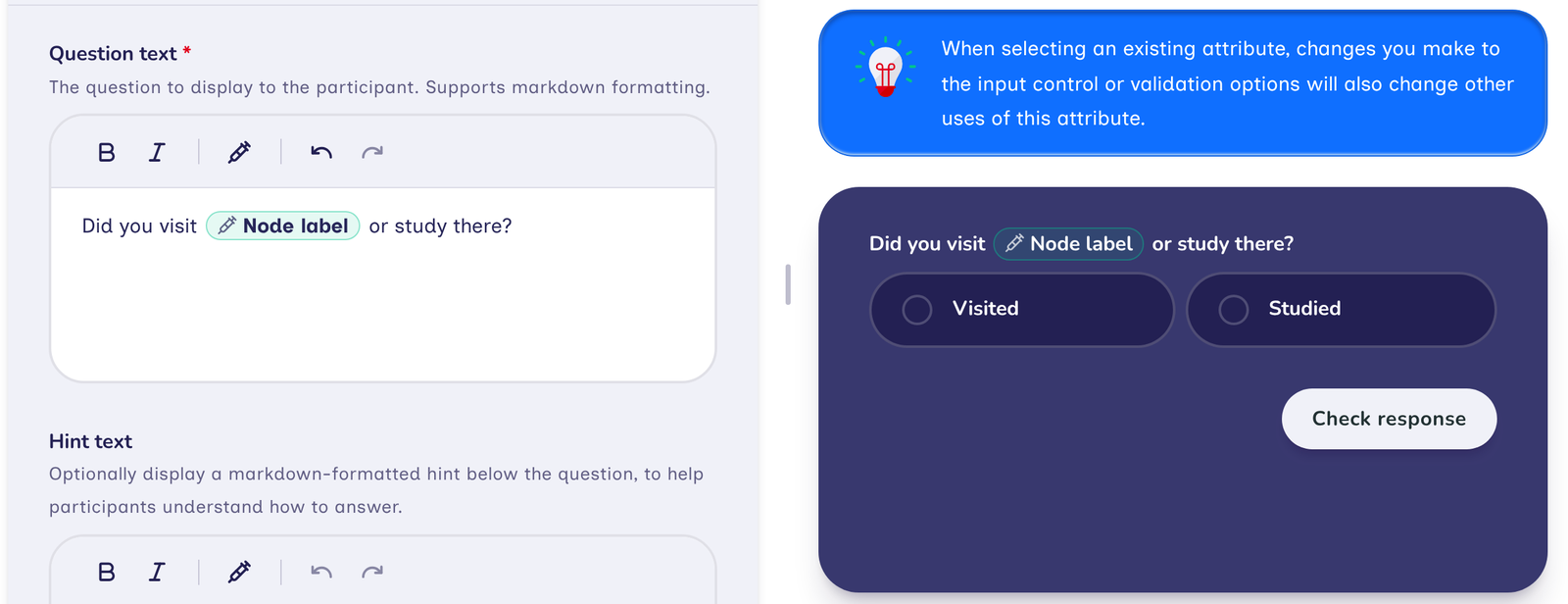
An attribute that a stage's translatable string shows, or whose answers determine the wording of that string, counts as in use in the codebook. It cannot be deleted until it is removed from that string.
When information is missing
Any attribute may be missing when the participant reaches a translatable string that pipes it. The participant may have declined to answer, skip logic may have bypassed the stage that collects it, or a roster may not include it. Returning to an earlier stage to change an answer, or deleting a node, can also leave an attribute unset, even when the protocol normally collects it beforehand.
So that a participant never encounters an incomplete sentence, every value that can be missing is inserted together with two versions of the surrounding text:
- If known, which shows the value, and which the participant sees when the value is present.
- If not known, which the participant sees instead when the value is missing.
When you insert the value, Architect adds both versions. Write each version for the case in which it is shown. A version may be left empty, so that nothing is shown in that case. In the editor, an empty version reads Shows nothing.
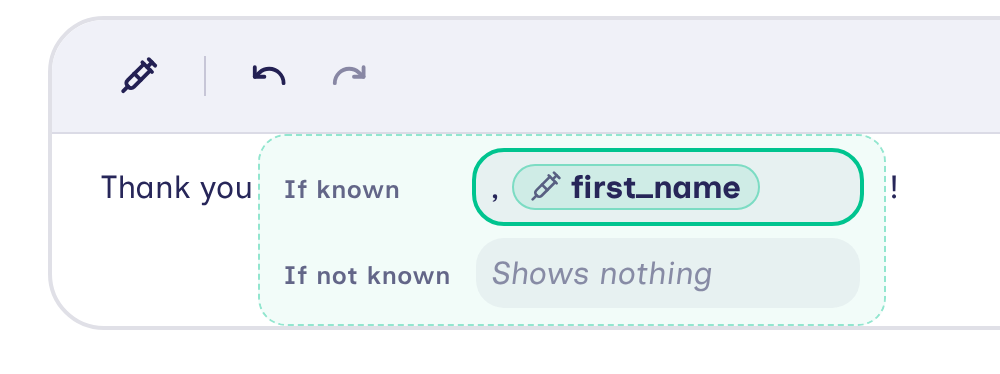
In the example above, the heading of an Information stage thanks the participant by name:
| Version | Text written | Participant sees |
|---|---|---|
| If known | ", " followed by first_name | Thank you, Sam! |
| If not known | (empty) | Thank you! |
"Thank you" precedes the versions and "!" follows them, so both cases share that wording.
In the editor, a value with versions is shown as its pill until it is selected. Clicking the pill, or reaching it with the arrow keys and pressing Enter or Space, opens its versions; pressing Escape, or moving focus out of the text, folds them back into the pill. A newly inserted value starts open, so that its versions can be written immediately. Elsewhere, such as the list of form fields, the field preview and the protocol's Summary tab, the value is shown only as its pill.
Zero and "no" are answers, not missing values: a number equal to 0, or a yes-or-no answer of no, shows the If known version. Text that is empty or contains only spaces, and a categorical answer with no options selected, count as missing.
Today's date and a node's label are never missing, so they are inserted on their own, without versions. The one exception is the prompt of an Ordinal Bin or Categorical Bin set to Tap to place: once every node has been placed, no node is being placed, so the label of the node being placed also needs an If not known version.
Node labels
A node's label is not a single attribute. The interview derives it for each node from that node's own data: an attribute named "name"; otherwise one whose name contains "name"; otherwise, for imported data, a column whose name contains "name" even if the codebook does not list it; otherwise the first text attribute that has a value. A node with none of these is shown as "Unnamed" during the interview. The piped label follows the same rules, so it always matches the text displayed on the node, even when two nodes of the same type draw their labels from different attributes. When the label comes from an encrypted attribute, the translatable string shows it in the same way as the node shows it. See Node Labeling for more on how labels are chosen.
A Family Pedigree stage labels its nodes in its own way, and its form's questions and hints show the label that the family tree shows: the name that the participant entered, "You" for the participant, or, for a relative left unnamed, the term that the stage assigns according to the relationship, such as "Mother" or "Sister 2". This term comes from the stage's wording and from the kinship words that are chosen in the stage's Words for family members setting. As the participant changes a relative's name, gender identity or sex assigned at birth in the side panel, the label shows what the family tree will show after the changes are saved. For an unnamed relative, it is the label that the stage saves as the relative's name when the participant leaves the stage.
The label is the usual way to identify a node in a question, as in "Are Jim and Alice friends?". A specific attribute is preferable when the translatable string needs that particular answer, such as a nickname, even where the label shows something else.
Logic
Logic is a group of alternative wordings, of which the participant sees one. It is inserted with the Insert logic button, which is beside the syringe button in the toolbar of every text field that accepts piped text. Its menu lists:
- If … else and If not … else, which choose a wording according to rules that you set. See If blocks.
- Each categorical, ordinal and boolean attribute that the string can show, marked Different wording for each answer. See Different wording for each answer.
- Each number and scalar attribute that the string can show, marked Wording that fits the number. See Wording for singular or plural numbers.
- In the questions and hints of a Family Pedigree's form, Participant or someone else, marked Different wording for the participant and everyone else. See Wording for the participant or someone else.
Attributes appear under the same headings as in the syringe button's menu. The menu can be filtered by typing, but it does not open when { is typed.
In the editor, logic appears as a pill, as a value does. It has its own color and its own icon in place of the syringe, so that it can be told apart from a value. Selecting the pill opens the logic in place, with one row for each of its wordings. A newly inserted piece of logic starts open. While it is folded, the pill also shows a preview of what its wordings say.
A wording may be left empty, so that nothing is shown in that case, and it may contain values and further logic.
The same logic can be used in a node type's own label. See Dynamic labels.
If blocks
An If block shows one wording when rules that you set are met, and another otherwise. To insert one:
- Place the cursor in the text where the wording should appear.
- Click Insert logic.
- Choose If … else, described in the menu as One wording when rules you set are met, another otherwise. To give the first wording to the case in which the rules are not met, choose If not … else instead.
- A dialog titled When should this text be shown? opens. Set the rules (see Rules), then choose Save rules.
The If block is inserted with two rows. The first is labeled If: followed by its rules, or If not: followed by its rules, and contains the wording for that case. The second, Otherwise, contains the wording shown when no other row applies. Write the wording for each row beside its label.
An open If block has these controls:
- Edit rules, on each row that has rules, reopens the rule builder for that row.
- Add else if asks for another set of rules, then adds a row labeled Else if: followed by those rules. The interview tests the rows from the top, and shows the wording of the first row that applies.
- Remove this case, on each row when the block has more than one row with rules, removes that row together with its rules and its wording. When only one row with rules remains, it can be removed only by deleting the whole If block from the string.
For example, a Per Alter Form question could depend on the age recorded for each person:
| Row | Text written |
|---|---|
| If: age is less than 18 | Which school does this person go to? |
| Otherwise | Where does this person work? |
The interview evaluates an If block again whenever the answers or edges that its rules test are changed, so the wording stays up to date throughout the interview.
Rules
Rules are set in the same rule builder that filters and skip logic use. What a rule can test depends on what the translatable string refers to:
- An attribute of the participant. This is available in every translatable string that accepts piped values.
- An attribute of the node that the string concerns, in a string that refers to a node.
- The edges of that node: whether the node has an edge of a given type, an attribute of one of its edges, or the number of edges that it has, of one type or of any type. The number can be compared with a number that you give, or with the other nodes of the same type, using Is the highest among nodes of its type and Is the lowest among nodes of its type. Nodes that tie for the highest, or for the lowest, all match. No node matches when every node of the type has the same number of edges.
- An attribute of the edge that a form asks about, in a Per Alter Edge Form's questions and hints.
A translatable string that refers to no node or edge, such as an Information stage's text or a Name Generator's prompt, can use only rules about the participant. See Where piped text can be used for what each string refers to.
Where the translatable string refers to two nodes, as with a pair on a Dyad Census, the dialog has a Check rules against setting, which offers The first node of the pair and The second node of the pair. Node rules and edge rules are checked against the node that is chosen in that setting.
When an If block has more than one rule, Rule Matching sets whether All rules must match or Any rule can match.
The rules of an If block belong to the stage and are not part of the translatable string. They are therefore the same in every language of the protocol.
Different wording for each answer
Each categorical, ordinal and boolean attribute is listed in the Insert logic menu, marked Different wording for each answer. Choosing it gives the translatable string one version for each answer, instead of displaying the answer itself. This allows a question to adapt its framing to an earlier response.
The versions are:
- If not known, used when there is no answer.
- One version for each of the attribute's options, named after the option's label. A boolean attribute without labels of its own has Yes and No.
- Any other answer, used for an answer that has no version of its own.
For example, a Per Alter Form question could depend on a "Lives with you" attribute:
| Version | Text written |
|---|---|
| If not known | How often do you see them at home? |
| Yes | How do you share household tasks with them? |
| No | How often do you visit them at home? |
| Any other answer | (empty, because yes and no cover every case) |
A categorical answer can include several options. The string then uses the version of the first of those options that has one, in the order in which the attribute's options are listed in the codebook, or Any other answer if none has one. Reordering the options in the codebook can therefore change which version is used.
Wording for singular or plural numbers
Each number and scalar attribute is also listed in the Insert logic menu, marked Wording that fits the number. It is intended for translatable strings in which the words around the number change with the number, as in "1 child" and "3 children".
It inserts If known and If not known versions, as for any value. Within If known there is one version for each grammatical number form that the language distinguishes. Each version is named with examples of the numbers that use it. English has two:
| Version | Text written | Participant sees |
|---|---|---|
| When it is 1 | the number, "child" | 1 child |
| When it is 0, 2, 3, … | the number, "children" | 3 children |
Each of these versions begins with the number, followed by the words that accompany it.
Other languages distinguish a different number of forms: Chinese has one, and Polish and Russian have more than two. When a localized string is written in another language, Architect provides that language's versions.
Wording for the participant or someone else
A Family Pedigree's form asks the same questions about the participant and about each of their relatives. In the questions and hints of that form, the Insert logic menu lists Participant or someone else, marked Different wording for the participant and everyone else. It inserts two versions:
| Version | Text written |
|---|---|
| About the participant | What is your first name? |
| About someone else | What is their first name? |
It chooses which of the two versions is shown. It is never shown. Whether a question is about the participant is always known, so it has no If not known version.
How participants see piped text
During the interview, each value is shown in the participant's language:
- A date is written in the format that the participant's language uses for dates. A date answer recorded only as a month or a year shows only the month or year.
- A number is written in the format that the participant's language uses for numbers.
- An answer to a categorical, ordinal or boolean question is shown by the option's label, in the participant's language. A label without a translation in that language is shown in the same way as any other translatable string that has no translation. An answer with several options is shown as a list, such as "cats, dogs and fish". A yes-or-no answer can be shown in this way only when both of its answers have labels; otherwise, use Different wording for each answer.
- A text answer is shown exactly as it was entered.
- Logic itself is never shown. The participant sees only the wording of the case that applies.
Each value is tinted with the interview's primary color. The tint distinguishes inserted information from the fixed wording of the question. Screen readers read the value as part of the sentence.
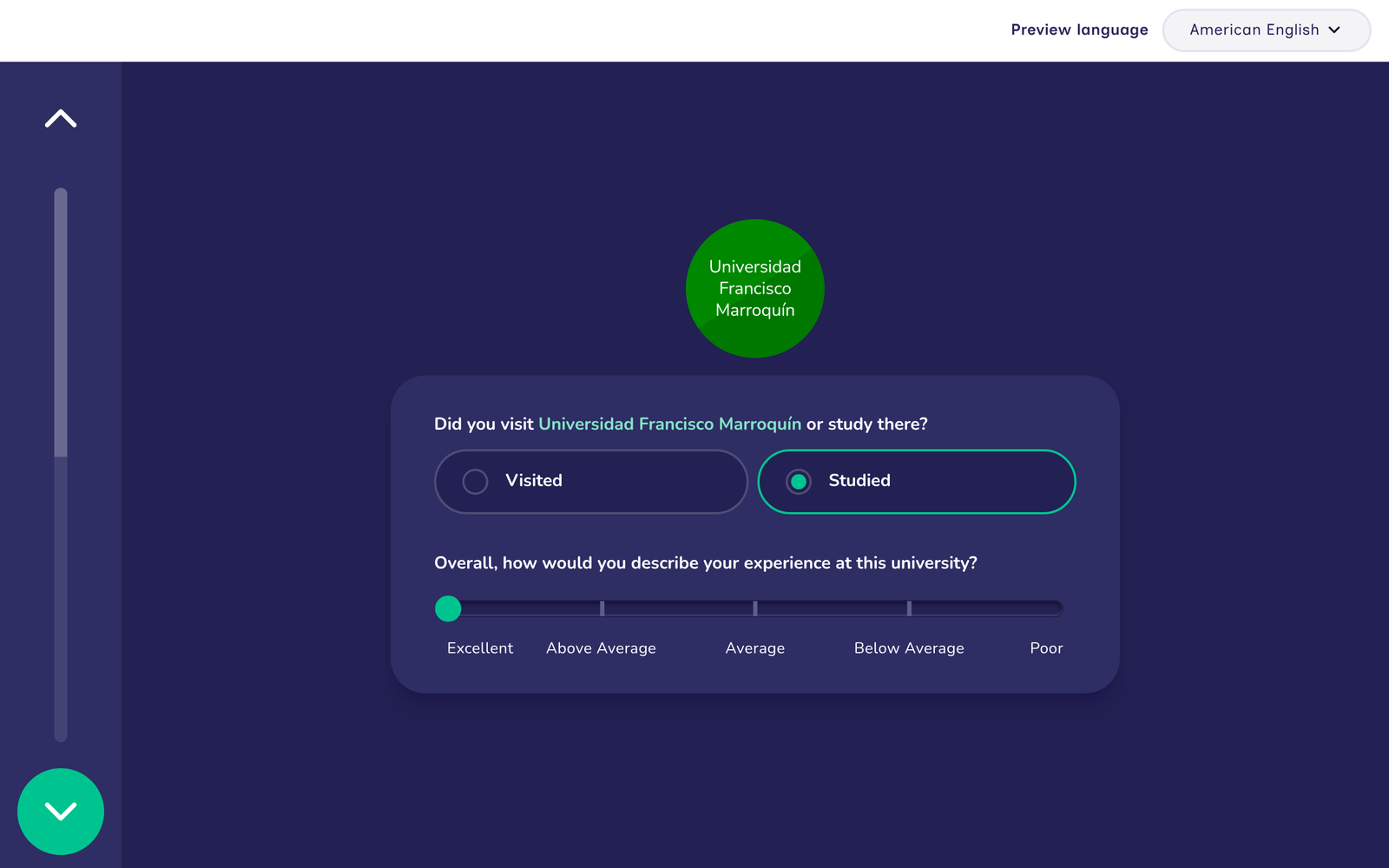
Preview mode is the most direct way to check piped text before fieldwork. With Start preview with example data switched on, the preview fills each value from generated data, as in the image above.
Where piped text can be used
Today's date and the participant's attributes can be shown in every translatable string that accepts piped values. The contextual attributes that are available depend on where the string appears:
| Where the string appears | Contextual Attributes |
|---|---|
| Stage text: an Information stage's text, an Anonymisation stage's explanation, a Finish Screen's closing and finished text, an Ego Form's introduction title and text, a Name Generator form's title, the panel titles of a name generator, the panel title of a roster, and a Family Pedigree's name for the participant | None |
| Prompts on the Name Generator, Quick Add, Roster, Sociogram and Family Pedigree, prompts on an Ordinal Bin or Categorical Bin set to Drag and drop, and the label of a Categorical Bin's "other" bin | None, because these stages show many nodes at once |
| Prompts on the Geospatial stage | The label and every attribute of the node being placed |
| Prompts on an Ordinal Bin or Categorical Bin set to Tap to place | The label and every attribute of the node being placed. Once every node is placed, these values show their If not known version |
| Prompts on the Dyad Census and Tie-Strength Census, and the Tie-Strength Census's label for the option stating that no tie is present | The labels of the two nodes that the question asks about, as First node: label and Second node: label, and every attribute of each, such as First node: nickname |
| Prompts on the One-to-Many Dyad Census | The label and every attribute of the one node to which the participant links others |
| An Ego Form's questions and hints | None |
| The questions and hints of forms about a node: Per Alter Form, Name Generator and Family Pedigree forms, and a Network Composer's fields for nodes, including each field's label and the labels at each end of its slider. The question that a Categorical Bin asks about a node placed in its "other" bin counts as one of these. | The label and every attribute of the node that the form asks about |
| A Per Alter Edge Form's questions and hints | Every attribute of the edge that the form asks about, and the labels of the two nodes that it joins |
| A Network Composer's fields for edges | The labels of the two nodes that the edge joins |
Where a form's attributes are available, a field can show any attribute of the node or edge that the form asks about, including attributes collected on earlier stages and the attribute that the field itself collects. When the attribute has no value yet, the field shows the value's If not known version. In a form, a node's label updates as the participant types, in the same way as the label on the node.
On an edge form, the labels of the two nodes that the edge joins are offered as First node: label and Second node: label. Their other attributes are not offered, because the nodes at either end of an edge can be of any type.
Some translatable strings never accept piped values:
- stage names
- image descriptions, because they stand in for an image
- strings in the codebook, such as the labels of options
- the wording supplied by Network Canvas, apart from a Family Pedigree's name for the participant. Some of this wording can show values that the interview fills in, such as the name of the stage's node type or a number, but not attributes
In a protocol upgraded from schema 8, braces that were already present in the text remain ordinary characters. They never become piped values.
Translating strings that show values
When a protocol is offered in more than one language (see Translating Your Protocol), each language has its own localized strings. Showing a value is optional in every language, so a translation can show more, fewer or different values than the localized string in the default language, or none at all. Nothing in the protocol compares the localized strings of one language with those of another. If the English If known version shows the nickname pill, for instance, the If known version of a translation may leave it out.
Each translation is checked on its own, by the same rules as the localized string in the default language: every value that it shows must be one that can be shown where the string appears, a value that can be missing needs a version for when it is missing, and at least one version of the string must not be blank.
In the translation table, a cell shows values, and each set of versions, as pills. When you edit a cell, selecting a pill opens its versions, as in the stage editor. The syringe button offers the same values as in the stage editor. The Insert logic button offers the same logic as in the stage editor, except If blocks.
An If block cannot be inserted in the translation table, and its rules cannot be changed there: its rows show their rules, without Edit rules, Add else if or Remove this case. To add an If block to a translation, or to change its rules, open the stage and choose the language in the text field's language menu (see Translating within the stage editor). Because the rules belong to the stage, changing them changes them for every language. Only the wording of each row is translated.
The values themselves are not translated. Dates and numbers follow the participant's language, and answers are shown with their options' labels in that language.
Problems reported by Architect
Protocol validation checks every translatable string that contains piped values or logic. Each problem below is an error. The stage cannot be saved, and the protocol is not valid, until the error is corrected.
Architect shows the message beneath the text field, or in the cell of the translation table. These messages are in English, whichever language Architect is set to.
Problems that you can encounter while editing
These problems can arise from editing a translatable string in Architect, from pasting text that was copied from another field, or from changing the codebook or the stage after the string was written.
| Message | What it means | How to fix it |
|---|---|---|
| Text cannot be blank in every version: at least one of its versions must show some text or a value. | The string has no wording outside its versions, and every version is empty, so the participant would never see anything. | Write wording in at least one version, or delete the value or logic from the string. |
| This text cannot use, followed by a value and a reason, or a message saying that something in the string no longer exists. In a node type's dynamic label, the message begins This label. | The string contains a value or logic that cannot be used where the string appears (see Where piped text can be used). This happens when the value or logic was pasted from another string, when its attribute was deleted or made encrypted, when the string has a version for an option that was deleted, or when the stage's node or edge type was changed. | Follow the entry for the message. See Reasons a value cannot be used. |
| The "nickname" attribute of the node this stage is about can be missing, so the text needs a version for when it is missing, and can show it only in its other versions. | The string shows a value outside an If known version. Every attribute can be missing, and so can a node's label in the prompt of a bin set to Tap to place (see When information is missing). This happens when a pill is moved or pasted out of its If known version. | Delete the pill, then insert the value again with the syringe button, which adds both versions. Then write the wording for each version. |
| The "smoker" attribute of the participant cannot be shown as words., followed by a sentence saying that the attribute is a yes/no attribute without labels for both of its answers. | The string shows the answer to a boolean attribute, but the attribute has no labels for yes and no, so there are no words to show. This happens when the labels are removed after the value was inserted. | Add both labels to the attribute in the codebook, or delete the pill and use Different wording for each answer. |
| Text cannot contain the private-use character U+E000: the interview uses it to place values. | The string contains an invisible character that the interview reserves for its own use. It usually arrives with text that was pasted from another program. | Delete the pasted passage and type it again. |
Reasons a value cannot be used
A message names a value in the way that Architect shows it to you. It names an attribute by its name and by the participant, node or edge that the attribute belongs to, such as the "nickname" attribute of the node this stage is about. It names other values as today’s date, the label of the first node of the pair, whether the node is the participant or an If block. In a node type's dynamic label, the message begins This label in place of This text. The message is one of these.
| Message | What it means | How to fix it |
|---|---|---|
| This text cannot use the "nickname" attribute of the node this stage is about, because the text does not refer to that node. | The value belongs to a node or edge that this string does not refer to. The message says which one, such as the first node of the pair or the edge this stage is about. | Delete the pill, then insert a value that the syringe button's menu offers for this string. |
| This text refers to an attribute that no longer exists. | The attribute is no longer in the codebook, or the stage now asks about a different node or edge type. | Delete the pill, then insert another value if the string needs one. |
| This text cannot use the "nickname" attribute of the node this stage is about, because the attribute is encrypted. | The attribute was made encrypted after it was piped. Encrypted attributes are never offered for piping. | Delete the pill, or stop encrypting the attribute. |
| This text chooses its wording by the "pets" attribute of the participant, but one of its versions is for an option that no longer exists. | The string has a version for each option of an attribute, and one of these versions is for an option that has since been deleted from the attribute. | Delete the set of versions for that attribute from the string, then insert a new set, which has a version for each of the attribute's current options. |
| This text has an If block whose rules are about the first node of the pair, which this text does not refer to. | The rules of an If block test a node or edge that this string does not refer to. The message says which one. This happens when an If block is pasted into another string of the same stage. | Delete the If block, then insert a new one in this string. Its rule builder offers only the rules that this string can use (see Rules). |
| This text cannot use whether the node is the participant, because this is known only in the questions of a Family Pedigree stage’s person form. | Participant or someone else was pasted into a string that is not a question or a hint of a Family Pedigree's form. | Delete the pill. |
Problems in a protocol edited outside Architect
Architect's editor does not write strings that break the rules below. These errors arise only when a protocol file has been changed by hand or by another program. Architect reports them when it opens or checks the protocol.
To fix any of them, go back to a copy of the protocol that Architect saved, or correct the file in the program that changed it.
| Message | The rule that was broken |
|---|---|
| Text is not valid message syntax, followed by a detail in parentheses. | A string must be written in the format in which Architect stores piped text. |
| This text cannot format numbers, dates or times, or contain tags. | A string can contain only wording, values and versions. The interview decides how a number or a date is written. |
| A version of this text cannot contain a line break. Put the line break outside the versions. | A version of a piece of formatted text cannot contain a line break, however long the version is. Text outside the versions can contain line breaks. |
| A link address cannot contain a value. Put the value in the words of the link, or outside the link. | A link in formatted text goes to one fixed address. The words of the link can show a value. |
| The "nickname" attribute of the node this stage is about is not a number, so it cannot choose a version of the text by number. | Only a number or scalar attribute can have wording that fits the number. |
| The singular and plural versions for the "age" attribute of the participant cannot use an offset. | Wording that fits the number is chosen according to the number that was given as the answer. |
| "several" is not a plural category. Use "zero", "one", "two", "few", "many" or "other". | Wording that fits the number has versions only for the grammatical number forms that languages distinguish. |
| An If block cannot be shown as words. or Whether the node is the participant cannot be shown as words., followed by a sentence saying that the value chooses which version of the text is shown. | The rules of an If block, and Participant or someone else, choose between wordings and are never shown as a value. |
| This text cannot use "ghost": it does not refer to an attribute, a node’s label, a condition or today’s date. | Each name must be one of those listed in Schema version 9: today's date, a node's label, an attribute of the participant, a node or an edge, the rules of an If block, or whether a node is the participant. This is the only message that quotes a name as it is written in the protocol file, because nothing else identifies the value. |
| This text has an If block whose rules no longer exist. | An If block must use rules that are saved with its stage, or with its node type in the case of a dynamic label. |
| A message that ends because a layout attribute cannot be shown in text. | Only the kinds of attribute listed in What can be piped can be shown. |
| This label cannot use today’s date: a node’s label can show only what is known about that node. | A node type's dynamic label cannot show today's date. |
| A message that ends but one of its versions is neither for yes nor for no, but one of its versions is neither for when its rules are met nor for when they are not, or but one of its versions is neither for the participant nor for everyone else. | For a boolean attribute, the rules of an If block, and Participant or someone else, versions are named true and false (see Schema version 9). |
| A message that ends but only a categorical, ordinal or yes/no attribute can have a different version for each answer. | Only a categorical, ordinal or boolean attribute can have a version for each answer. Any other value has only an If known version and an If not known version. |
| A message that ends but one of its versions is for an option that no longer exists, when a version is named by the option's value instead of its id. | A version for an answer to a categorical or ordinal attribute is named by the id of its option, with each hyphen replaced by an underscore, and not by the option's value. |
Related concepts
- Prompts: the questions that can contain piped text
- Forms: form fields whose questions and hints can refer to earlier answers
- Node Labeling: how the interview chooses the text shown on a node, and how a dynamic label uses the same values and logic
- Skip Logic: the rule builder in which an If block's rules are set
- Variables: the kinds of attribute that can be piped
- Translating Your Protocol: writing a protocol in more than one language