desktop 🠖 interface documentation
Family Pedigree
Type:
Name Generator, Edge Generator, Name Interpreter
Creates:
Nodes and edges representing family relationships, with attribute data
Uses Prompts:
true
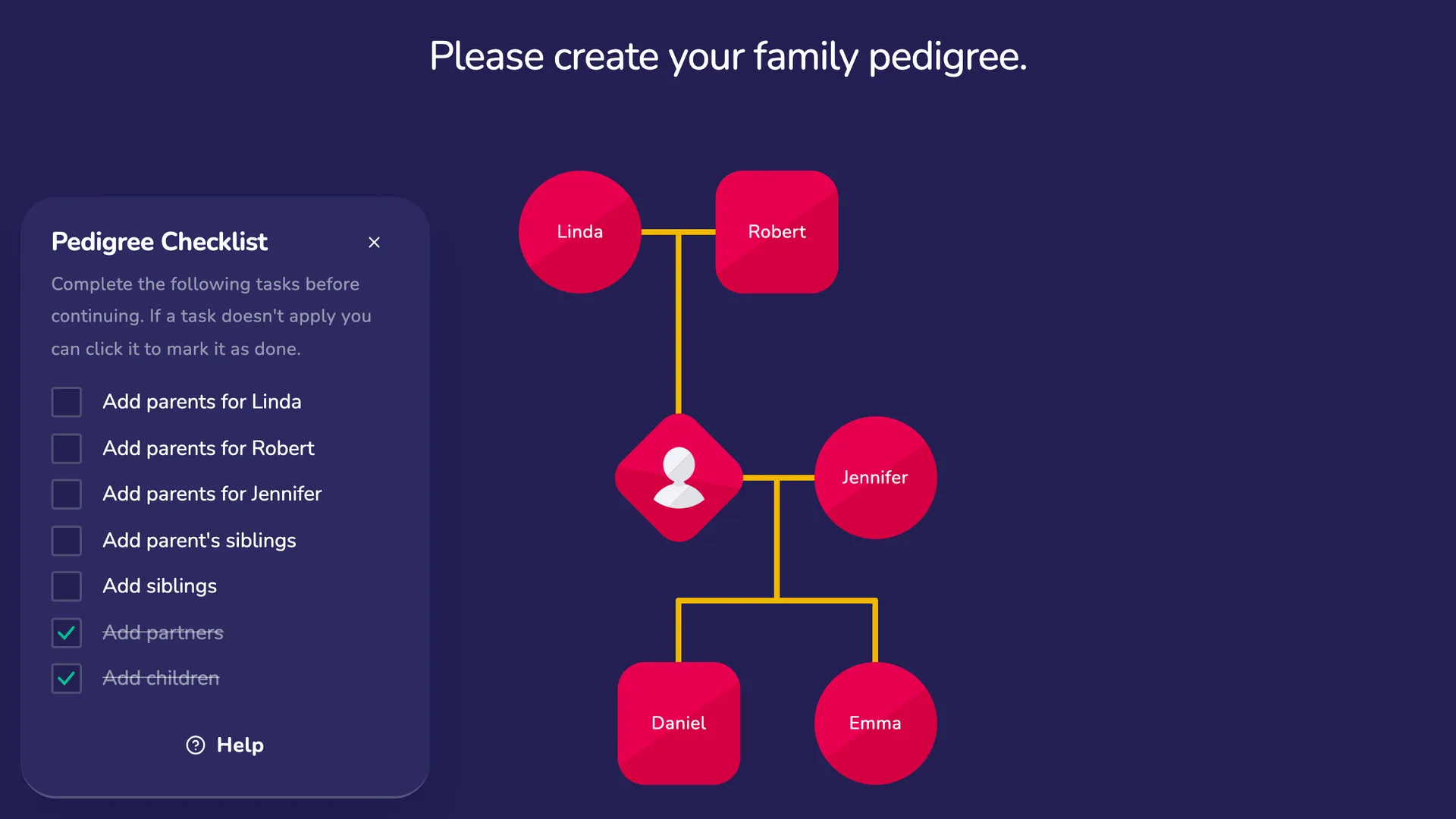
The Family Pedigree is a specialized interface designed for collecting family network data. It provides a structured, visual approach that allows participants to build their family tree by creating family members (nodes) and defining the relationships between them (edges).
Unlike other name generators, the Family Pedigree uses a multi-step process that guides participants through building the structure of their family tree before adding detailed information about each family member.
Scaffolding Step
In the scaffolding step, participants build the basic structure of their family tree. They add family members as nodes and define the relationships between them using a visual tree-building interface. The interface automatically positions nodes based on family relationships.
Configure this step with:
- Prompt Text: Instructions shown to participants explaining how to build their family tree
- Quick Start Modal: Optionally show a form that allows participants to quickly scaffold a start to their family tree
Name Generation Step
In this step, participants add information about each family member. A configurable form allows you to collect specific attributes for each node.
Configure this step with:
- Prompt Text: Instructions explaining the task
- Form Title: The heading displayed on the form (e.g., "Add personal information")
- Form Fields: Add fields to collect specific attributes about each family member
Family Pedigree Variables
The Family Pedigree requires specific variables to store family tree data. These variables are used internally by the interface to manage the tree structure and visual representation.
Node Variables
Biological sex is recorded for every person — the participant and each relative — in a single node variable.
| Variable | Type | Description |
|---|---|---|
| Biological Sex | Categorical (female, male, intersex, don't know, prefer not to say) | The sex each person was recorded as at birth. This is deliberately distinct from gender identity, and is asked with sensitive, opt-out wording. It is required for sex-linked inheritance (X-linked, Y-linked, mitochondrial) in a linked Narrative Pedigree stage. Only "female" and "male" drive sex-linked transmission; "intersex", "don't know", and "prefer not to say" are stored and treated as uncertainty rather than guessed. |
| Relationship to Participant | Text | Stores each person's relationship to the participant (e.g., mother, uncle, daughter). Automatically calculated by the interface from the tree structure. |
| Ego Identifier | Boolean | Identifies which node represents the participant (ego). Can be used in later-stage filtering to exclude the participant from attribute collection. |
Edge Variables
| Variable | Type | Description |
|---|---|---|
| Relationship Type | Categorical (biological, social, donor, surrogate, adoptive, partner) | The type of relationship between two people. Only biological and donor relationships pass conditions on genetically; social, adoptive, surrogate, and partner relationships do not. |
| Relationship Active | Boolean | Whether a partnership is current or past. |
| Gestational Carrier | Boolean | Marks a parent relationship where that person carried the pregnancy (a gestational carrier or surrogate). |
| Gamete Role | Categorical (egg, sperm) | Which gamete a biological or donor parent contributed. This also lets the Narrative Pedigree resolve a parent's biological sex when it was not recorded directly (egg → female, sperm → male). |
Disease Nomination Step (Optional)
If enabled, this step allows participants to identify family members who have experienced specific health conditions or diseases. Each prompt:
- Asks about a specific condition using customizable prompt text
- Stores responses in a boolean variable on each node
- Allows participants to identify which family members are affected by highlighting nodes where the variable value is true
Best Practices
Ensure you collect a value for a variable called name on your form, so that node labelling works correctly.
Use the Disease Nomination Step for collecting health condition data rather than adding boolean fields to the name generation form. This dedicated step provides a more intuitive interface for participants to identify affected family members.
Try to Avoid
Resist the urge to create long forms with many items. Since participants will complete this form for each family member, shorter forms reduce response burden and encourage more complete family trees.