Design Protocolspiped text
Piped Text
Purpose
Computer-assisted survey instruments have long tailored question wording to the respondent by inserting earlier answers into later questions, a technique usually called piping or text fill. Network instruments have a particular need for it. A name interpreter asks the same questions about each alter in turn, and a Dyad Census asks the same question about every pair of alters. Without piping, such questions must refer to the alter indirectly ("this person", "these two people") and rely on the participant to connect the question with the node on the screen.
Naming the node in the question removes that inferential step. "Did you visit Northwestern University or study there?" identifies its referent unambiguously, while "Did you visit this university, or study there?" does so only in combination with the visual layout of the interface. The difference is greatest when nodes resemble one another, when the participant has named many alters, and when the interview is administered by an interviewer who reads the question aloud.
Piped text also allows a later question to build on an earlier one. A question can recall the date the participant gave for a life event, address the participant by the name they provided, or be phrased differently according to how the participant answered a previous question.
Network Canvas fills piped text from data already recorded in the interview. Inserting a value into a question does not store that value a second time, and does not send it anywhere else.
Good to know:
Piped text requires schema 9. Protocols that use it are built in Architect and run in Fresco 5.0 or later, or Interviewer 9.0 or later.
Methodological considerations
Piping changes the stimulus each participant receives. Two participants answering the "same" name interpreter question read different words, because each question names a different alter. For most network instruments this is the intended effect: the construct being measured is the participant's relationship with a specific alter, and naming that alter makes the question more precise. It nevertheless calls for three precautions.
- Report the template, not the realized wording. When describing an instrument in a publication or an ethics application, give the question as written in the protocol, with the piped element marked, and state which attribute supplied it.
- Specify the wording used when information is missing. Any attribute can be absent when a question is shown (see When information is missing). The alternative wording is part of the instrument and should be reviewed with the same care as the primary wording.
- Pilot with realistic data. Long names, names that are also common words, and unexpected answers can produce questions that read poorly. Cognitive interviews and pilot sessions (see Piloting Your Study) should include the range of values that participants are likely to provide.
Piping is also a design decision about disclosure. A question that repeats a participant's answer displays that answer on screen again, which may matter when interviews take place in shared or public settings. Encrypted attributes are never offered for piping.
What can be piped
Each piece of information inserted into text is a piped value. A piped value is one of the following:
- Today's date. This is the only information about the interview itself that text can show. It is the date on which the participant reads the text.
- An attribute of the participant, such as a name or an answer from an Ego Form.
- The label of a node that the text concerns, on stages and forms that ask about one node or two nodes at a time. This is the text the interview displays on the node, so a question on a Dyad Census can ask "Are Jim and Alice friends?" using the same names the participant sees on the two nodes. See Node labels.
- An attribute of the node or edge that the text concerns, on the same stages and forms. A Per Alter Form question can, for example, name the university that the participant nominated for that node on an earlier stage.
The following kinds of attribute can be piped: text, number, scalar, date, boolean (yes or no), ordinal and categorical. Encrypted attributes are never offered, and neither are layout or location attributes.
The values available to a given text depend on where the text appears. See Where piped text can be used.
Inserting piped text in Architect
Every text field that accepts piped text has a syringe button in its toolbar, labeled Inject piped text from interview metadata or a network attribute. To insert a value:
- Place the cursor in the text where the value should appear.
- Click the syringe button, or type
{. - A menu lists the values that this text can show. Type to filter the list.
- Choose a value by clicking it, or press Enter to choose the highlighted value.
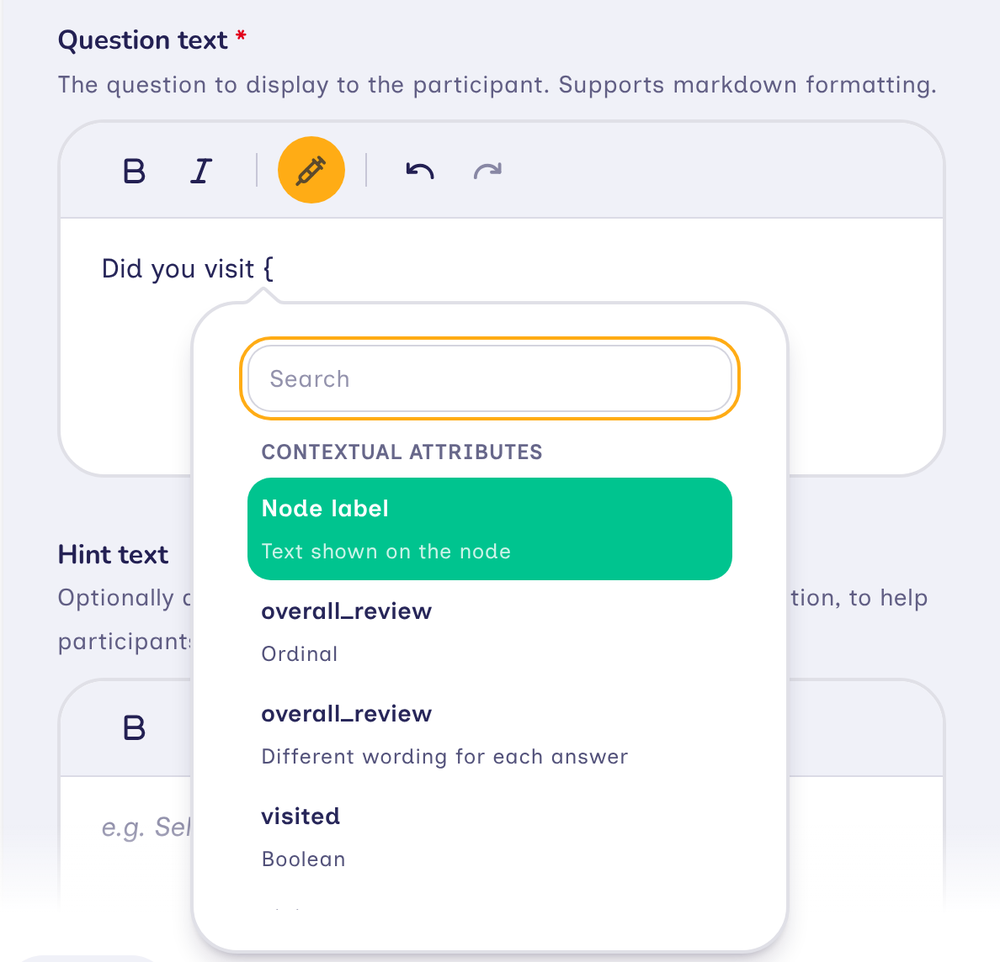
The menu groups values under three headings, in this order:
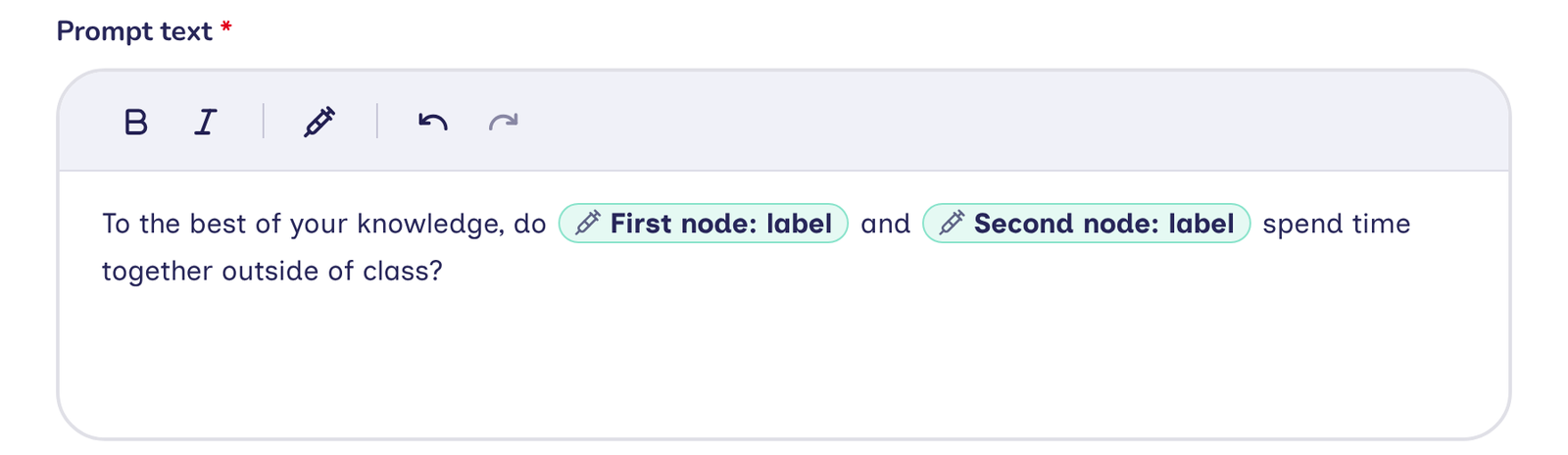
- Contextual Attributes: the label and attributes of the entity that the text is shown with, that is, the node or edge a form asks about, or the node a prompt asks about. A node's label is listed first, as Node label. Where the text concerns two nodes, as with a pair on a Dyad Census or Tie-Strength Census or the two ends of an edge, every value names the node it belongs to, such as First node: label, First node: nickname and Second node: label (see Where piped text can be used).
- Ego Attributes: the participant's attributes.
- Interview Attributes: today's date.
Beneath each value, the menu states what kind of attribute it is.
To type a literal brace, press Escape after typing {. The menu closes and the brace remains in the text.
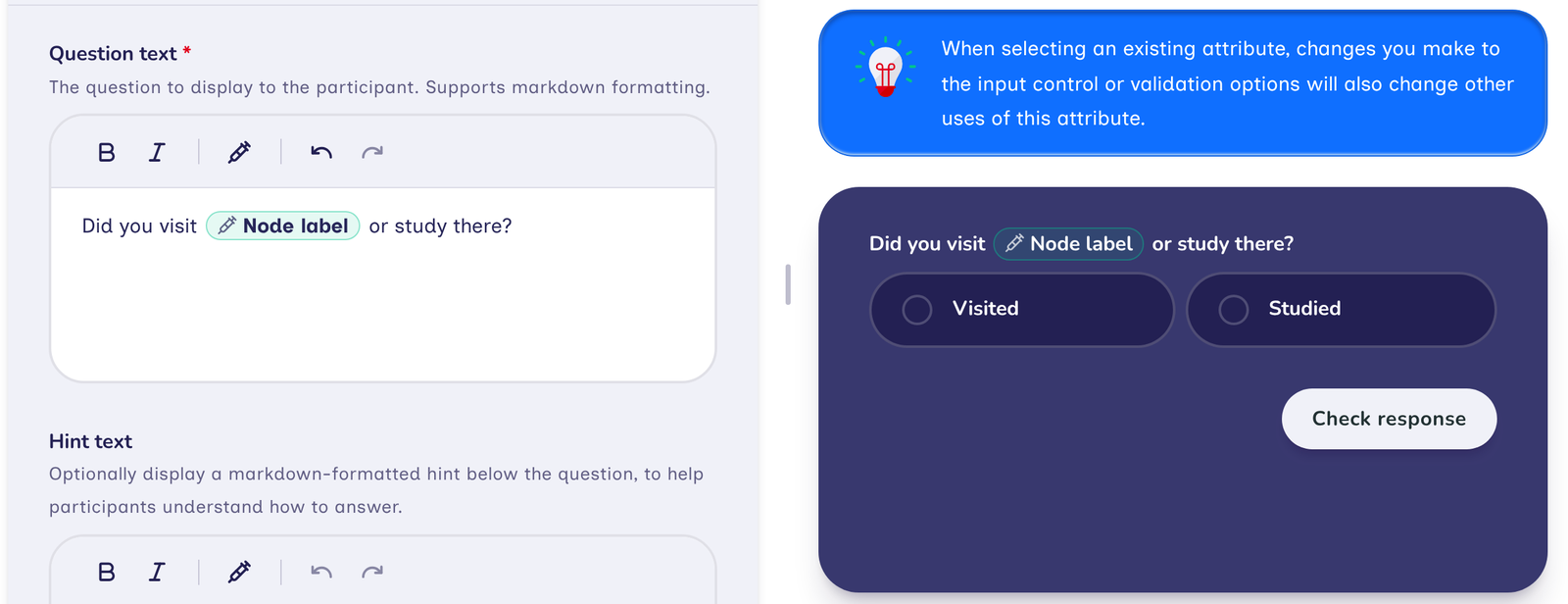
In the editor, a piped value appears as a pill that begins with the syringe icon and carries the name of its attribute, such as nickname. Where the text concerns two nodes, the pill also names the node, such as First node: nickname. A node's label appears as Node label, or as First node: label and Second node: label, and today's date appears as Today's date. The same pills appear in the translation table and on the protocol's Summary tab. The interactive preview beside a form field shows the pill in place of the value.
Architect records which values each stage's text uses. An attribute that is piped into any text counts as in use in the codebook, and cannot be deleted until it is removed from that text.
When information is missing
Any attribute may be missing when the participant reaches a text that pipes it. The participant may have declined to answer, skip logic may have bypassed the stage that collects it, or a roster may not include it. Returning to an earlier stage to change an answer, or deleting a node, can also leave an attribute unset, even when the protocol normally collects it beforehand.
So that a participant never encounters an incomplete sentence, every value that can be missing is inserted together with two versions of the surrounding text:
- If known, which shows the value, and which the participant sees when the value is present.
- If not known, which the participant sees instead when the value is missing.
Architect adds both versions when the value is inserted, and each version is then written to suit its case. A version may be left empty, so that nothing is shown in that case. In the editor, an empty version reads Shows nothing.
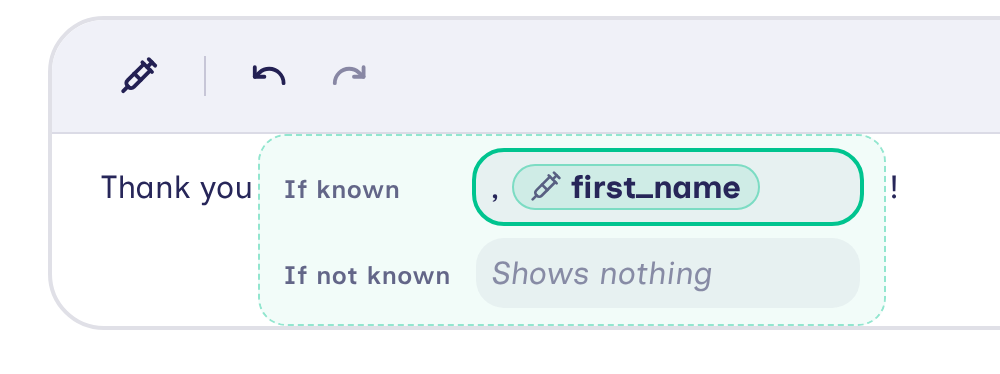
In the example above, the heading of an Information stage thanks the participant by name:
| Version | Text written | Participant sees |
|---|---|---|
| If known | ", " followed by first_name | Thank you, Sam! |
| If not known | (empty) | Thank you! |
"Thank you" precedes the versions and "!" follows them, so both cases share that wording.
In the editor, a value with versions is shown as its pill until it is selected. Clicking the pill, or reaching it with the arrow keys and pressing Enter or Space, opens its versions; pressing Escape, or moving focus out of the text, folds them back into the pill. A newly inserted value starts open, so that its versions can be written immediately. Elsewhere, such as the list of form fields, the field preview and the protocol's Summary tab, the value is shown only as its pill.
Zero and "no" are answers, not missing values: a number equal to 0, or a yes-or-no answer of no, shows the If known version. Text that is empty or contains only spaces, and a categorical answer with no options selected, count as missing.
Today's date and a node's label are never missing, so they are inserted on their own, without versions. The one exception is the prompt of an Ordinal Bin or Categorical Bin set to Tap to place: once every node has been placed, no node is being placed, so its label also needs an If not known version.
Node labels
A node's label is not a single attribute. The interview derives it for each node from that node's own data: an attribute named "name"; otherwise one whose name contains "name"; otherwise, for imported data, a column whose name contains "name" even if the codebook does not list it; otherwise the first text attribute that has a value. A node with none of these is shown as "Unnamed", in the interview's own wording. The piped label follows the same rules, so it always matches the text displayed on the node, even when two nodes of the same type draw their labels from different attributes. When the label comes from an encrypted attribute, the text shows it exactly as the node does. See Node Labeling for more on how labels are chosen.
A Family Pedigree stage labels its nodes in its own way, and its form's questions and hints show the label that the family tree shows: the name the participant entered, "You" for the participant, or, for a relative left unnamed, the term the stage assigns according to the relationship, such as "Mother" or "Sister 2", in the stage's wording and framing. As the participant changes a relative's name, gender identity or sex assigned at birth in the side panel, the label changes as the family tree will once the changes are saved. For an unnamed relative, it is the label that the stage saves as the relative's name when the participant leaves the stage.
The label is the usual way to identify a node in a question, as in "Are Jim and Alice friends?". A specific attribute is preferable when the text needs that particular answer, such as a nickname, even where the label shows something else.
Different wording for each answer
A categorical, ordinal or boolean attribute appears twice in the menu. The second entry is marked Different wording for each answer. Choosing it gives the text one version for each answer, in place of displaying the answer itself. This allows a question to adapt its framing to an earlier response.
The versions are:
- If not known, used when there is no answer.
- One version for each of the attribute's options, named by the option's label. A boolean attribute without labels of its own has Yes and No.
- Any other answer, used for an answer that has no version of its own.
For example, a Per Alter Form question could depend on a "Lives with you" attribute:
| Version | Text written |
|---|---|
| If not known | How often do you see them at home? |
| Yes | How do you share household tasks with them? |
| No | How often do you visit them at home? |
| Any other answer | (empty, because yes and no cover every case) |
A categorical answer can include several options. The text then uses the version of the first of those options that has one, or Any other answer if none does. Options keep the order they had when the value was inserted, so reordering them in the codebook later does not change which version is used.
Wording that agrees with a number
A number or scalar attribute also appears twice in the menu. The second entry is marked Wording that fits the number. It is intended for text whose surrounding words change with the number, as in "1 child" and "3 children".
It inserts If known and If not known versions, as for any value. Within If known there is one version for each grammatical number form the language distinguishes, each named with examples of the numbers that use it. English has two:
| Version | Text written | Participant sees |
|---|---|---|
| When it is 1 | the number, "child" | 1 child |
| When it is 0, 2, 3, … | the number, "children" | 3 children |
Each of these versions begins with the number, followed by the words that accompany it.
Other languages distinguish a different number of forms: Chinese has one, and Polish and Russian have more than two. When text is written in another language, Architect provides that language's versions.
How participants see piped text
The interview presents each value in the participant's language:
- A date is written as the participant's language writes dates. A date answer recorded only as a month or a year shows only the month or year.
- A number is written as the participant's language writes numbers.
- An answer to a categorical, ordinal or boolean question is shown by the option's label, in the participant's language. A label without a translation in that language is shown in the way untranslated text always is. An answer with several options is shown as a list, such as "cats, dogs and fish". A yes-or-no answer can be shown in this way only when both of its answers have labels; otherwise, use Different wording for each answer.
- Text is shown exactly as it was entered.
Each value is tinted with the interview's primary color, which distinguishes inserted information from the fixed wording of the question. Screen readers read the value as part of the sentence.
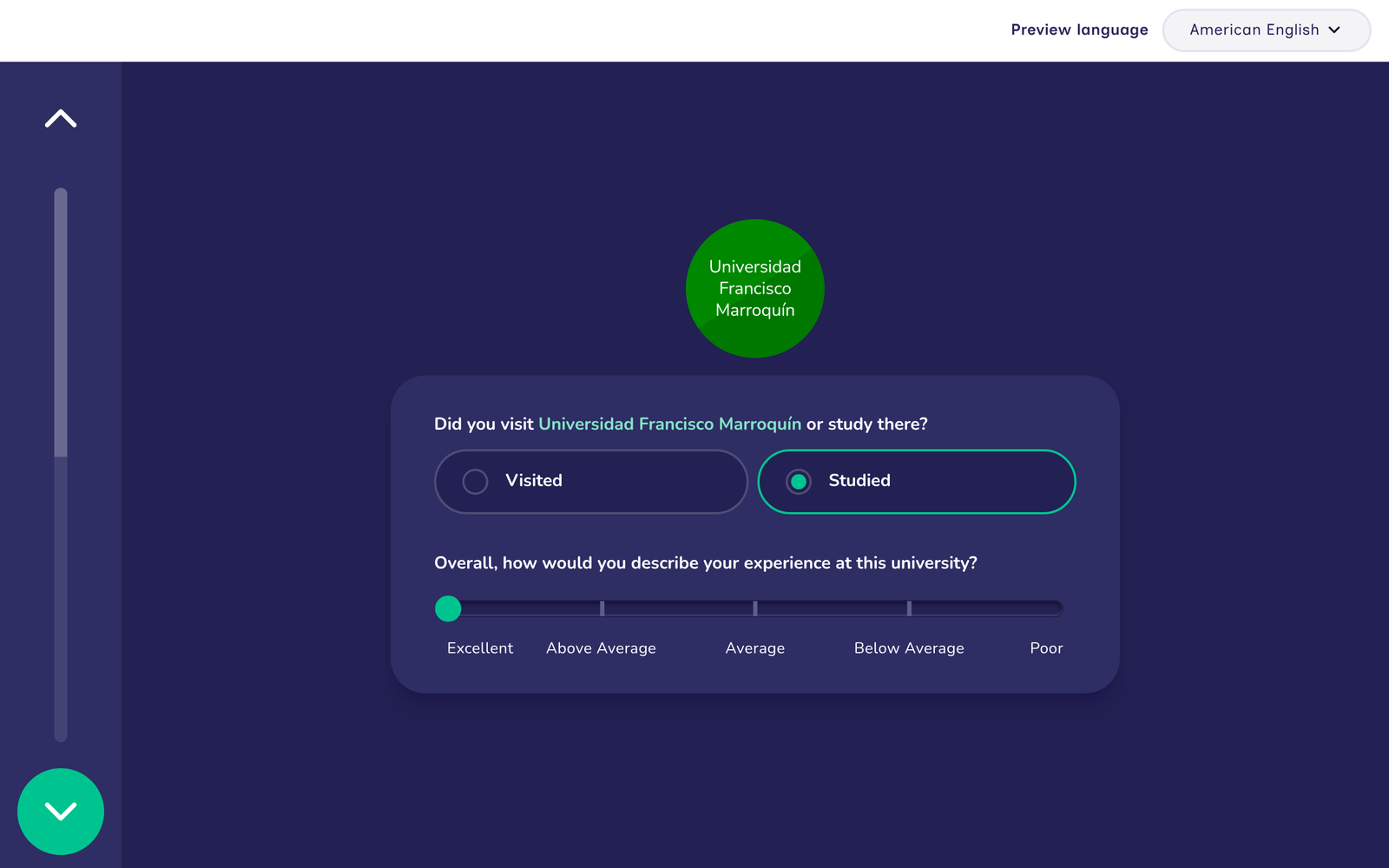
Preview mode is the most direct way to check piped text before fieldwork. With Start preview with example data switched on, the preview fills each value from generated data, as in the image above.
Where piped text can be used
Today's date can be shown in every text that accepts piped values. The attributes available depend on where the text appears:
| Where the text appears | Ego Attributes | Contextual Attributes |
|---|---|---|
| Stage text: an Information stage's title and text, an Anonymisation stage's explanation, a Finish Screen's closing and finished text, an Ego Form's introduction title and text, a Name Generator form's title, the panel titles of a name generator, the panel title of a roster, and a Family Pedigree's name for the participant | Yes | None |
| Prompts on the Name Generator, Quick Add, Roster, Sociogram and Family Pedigree, prompts on an Ordinal Bin or Categorical Bin set to Drag and drop, and the label of a Categorical Bin's "other" bin | Yes | None, because these stages show many nodes at once |
| Prompts on the Geospatial stage | Yes | The label and every attribute of the node being placed |
| Prompts on an Ordinal Bin or Categorical Bin set to Tap to place | Yes | The label and every attribute of the node being placed. Once every node is placed, they show their If not known version |
| Prompts on the Dyad Census and Tie-Strength Census, and the Tie-Strength Census's label for the option stating that no tie is present | Yes | The labels of the two nodes the question asks about, as First node: label and Second node: label, and every attribute of each, such as First node: nickname |
| Prompts on the One-to-Many Dyad Census | Yes | The label and every attribute of the one node to which the participant links others |
| An Ego Form's questions and hints | Yes | None |
| The questions and hints of forms about a node: Per Alter Form, Name Generator and Family Pedigree forms, and a Network Composer's fields for nodes, including each field's label and the labels at each end of its slider. The question a Categorical Bin asks about a node placed in its "other" bin counts as one of these. | Yes | The label and every attribute of the node the form asks about |
| A Per Alter Edge Form's questions and hints | Yes | Every attribute of the edge the form asks about, and the labels of the two nodes it joins |
| A Network Composer's fields for edges | Yes | The labels of the two nodes the edge joins |
Where a form's attributes are available, a field can show any attribute of the node or edge that the form asks about, including attributes collected on earlier stages and the attribute that the field itself collects. When the attribute has no value yet, the field shows the value's If not known version. A node's label in a form follows the answers as the participant types them, as the node does.
On an edge form, the labels of the two nodes that the edge joins are offered as First node: label and Second node: label. Their other attributes are not offered, because the nodes at either end of an edge can be of any type.
Some text never accepts piped values:
- stage names
- image descriptions, because they stand in for an image
- text in the codebook, such as the labels of options
- the wording Network Canvas supplies, apart from a Family Pedigree's name for the participant. Some of this wording can show values the interview fills in, such as the name of the stage's node type or a number, but not attributes
In a protocol upgraded from schema 8, braces that were already present in the text remain ordinary characters. They never become piped values.
Translating text that shows values
When a protocol is offered in more than one language (see Translating Your Protocol), each language has its own versions of the text. Showing a value is optional in every language, so a translation can show more, fewer or different values than the default language's text, or none at all. Nothing in the protocol compares one language's text with another's. If the English If known version shows the nickname pill, for instance, the If known version of a translation may leave it out.
Each translation is checked on its own, by the same rules as the default language's text: every value it shows must be one the stage uses and can show where the text appears, a value that can be missing needs a version for when it is missing, and the text can't be blank in every version.
In the translation table, a cell shows values, and each set of versions, as pills. When editing a cell, selecting a pill opens its versions, as in the stage editor, and the syringe button offers the values that the stage already uses. A value that the stage does not yet use must first be added in the stage editor.
The values themselves are not translated. Dates and numbers follow the participant's language, and answers are shown with their options' labels in that language.
Problems Architect reports
Protocol validation checks every text that contains piped values. Each of the following is an error, and the protocol is not valid until it is corrected:
- A value can't be shown here. The text shows a value that is not available where the text appears (see Where piped text can be used). This can happen when the attribute no longer exists or has been made encrypted.
- A value can be missing, so the text needs a version for when it is missing. The text shows an attribute outside an If known version. Every attribute can be missing, so the text needs an If not known version for it (see When information is missing).
- A version stands for an answer the attribute doesn't have. This occurs when one of an attribute's options is removed or changed after text has been given a version for each of its answers. Remove every set of versions for that attribute from the stage's text, then insert them again so that they match the attribute's options.
- A yes-or-no attribute needs labels for both of its answers. The text shows the answer itself, but the attribute has no labels for yes and no. Add both labels to the attribute, or use Different wording for each answer.
- Text can't be blank in every version. At least one version must show some text or a value.
Related concepts
- Prompts: the questions that can contain piped text
- Forms: form fields whose questions and hints can refer to earlier answers
- Node Labeling: how the interview chooses the text shown on a node
- Variables: the kinds of attribute that can be piped
- Translating Your Protocol: writing a protocol in more than one language